How to verify Registration Number in Malaysia?
Registration number Search on SSM website
SSM (Suruhanjaya Syarikat Malaysia — Companies Commission of Malaysia) is the official registrar for all Malaysian business entities. The free SSM eSearch portal lets you verify a company's Business Registration Number (BRN) — including both old and new 12-digit formats — instantly and without a login.
- Access the Portal: Go to the SSM eSearch Tool.
- Enter the Registration Number: Enter the company's BRN. The portal accepts both the old format (e.g.
200866-V) and the new 12-digit format (e.g.199001009294). Both return results for the same entity. - Review the Result: A successful lookup returns:
- Registration Number
- New Registration Number
- Entity Name
- Status
- GST Number
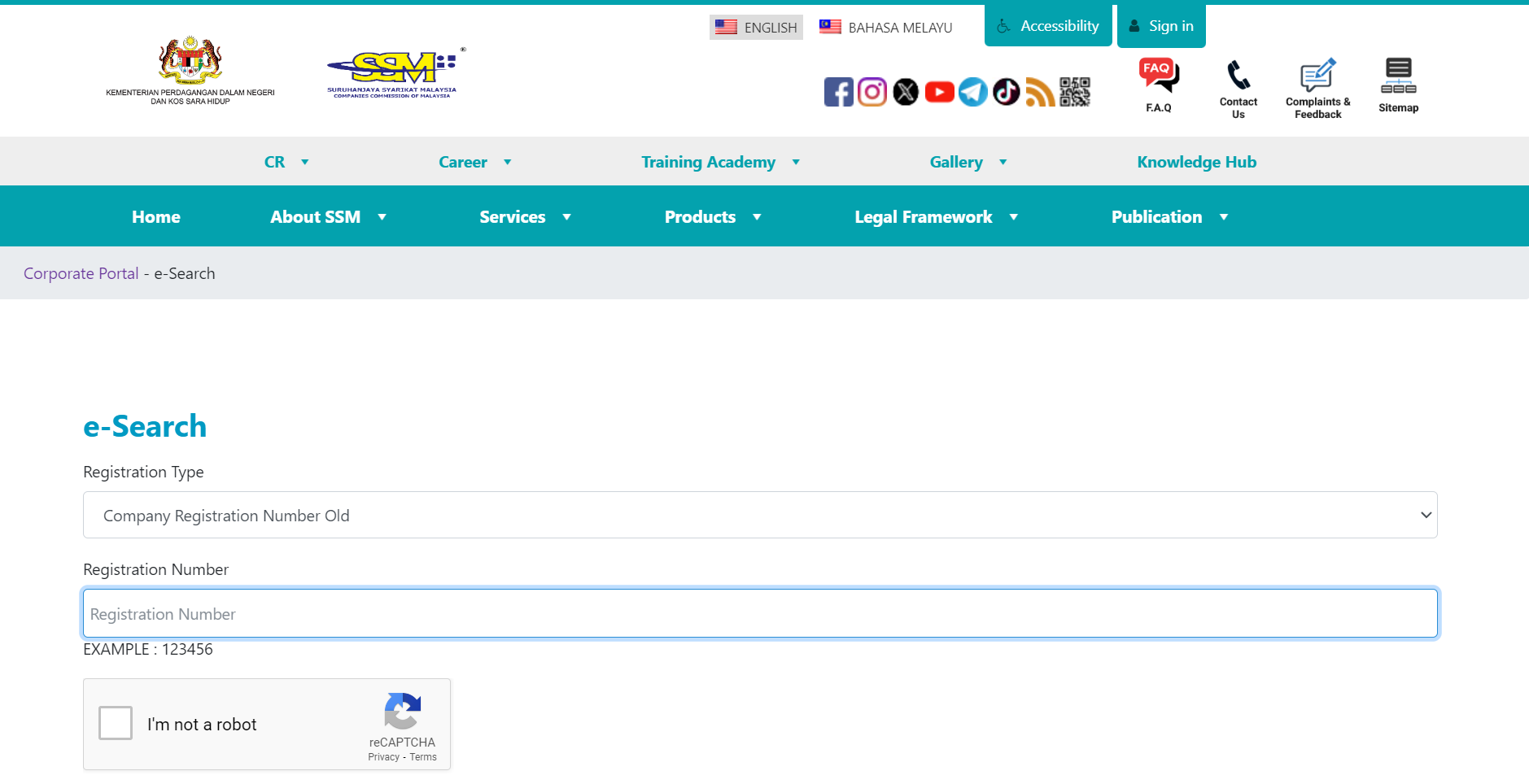 |
| Registration Number Search on SSM |
Example registration numbers:
- New format:
199001009294 - Old format:
200866 - GST number:
001107427328
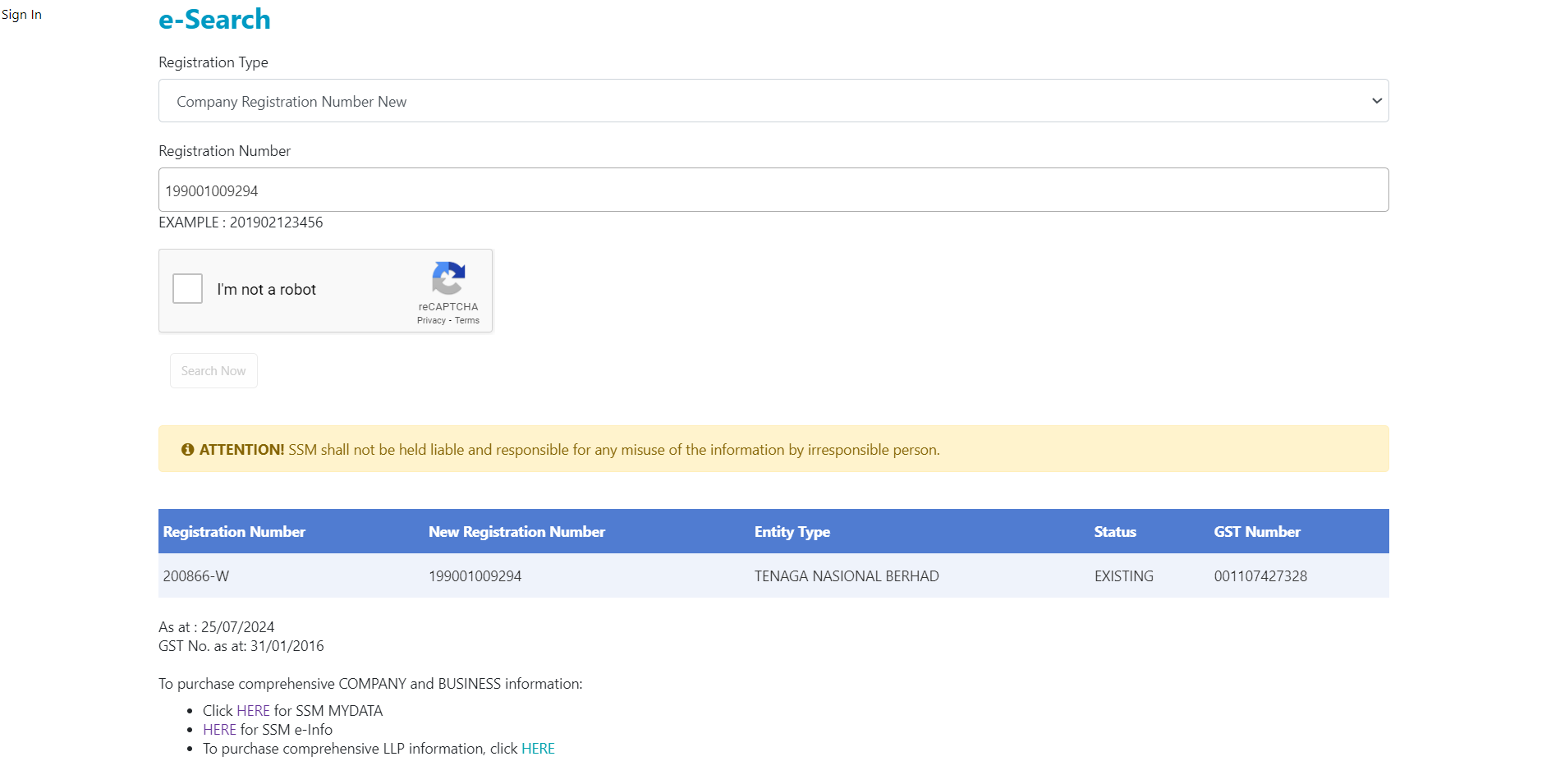 |
| Successful Registration Number Verification on SSM |
The free SSM eSearch returns registration number, entity name, and status — it does not show director names, shareholders, charges, or financial data. For full due diligence, use a paid company profile from SSM e-Info or MYDATA-SSM, both official SSM-authorised portals. For SST verification, use the RMCD MySST portal — SSM does not hold SST registration data.
For more details on Malaysian tax IDs, see our Malaysia Tax ID Guide.
Frequently Asked Questions
Why does the SSM eSearch portal show two different registration numbers for the same company?
Every company registered in Malaysia before 11 October 2019 has both an old-format number (typically 6–7 digits followed by a letter suffix, e.g. 200866-V) and a new 12-digit Business Registration Number (BRN) assigned by SSM from October 2019 onward (e.g. 199001009294). The 12-digit format encodes the year of registration, a two-digit entity code, and a six-digit sequential number. Both numbers refer to the same legal entity and remain valid for use on invoices and official correspondence during the transition period. The SSM eSearch portal accepts either format as a search input and returns both numbers in results. [1] [2]
Is the SSM registration number the same as an SST registration number?
No — these are issued by two entirely separate government bodies and serve different purposes. The SSM Business Registration Number (BRN) is issued by the Companies Commission of Malaysia and identifies a legal business entity. The SST registration number is issued by the Royal Malaysian Customs Department (RMCD) and identifies a business registered to collect Sales and Service Tax. A company may have a valid SSM number but no SST number if its revenue is below the applicable threshold or its goods and services are not subject to SST. To verify SST registration specifically, use the RMCD's MySST portal at mysst.customs.gov.my — the SSM eSearch portal does not contain SST data. [1]
What does "Struck Off" status on the SSM eSearch result mean, and can that company still legally transact?
A "Struck Off" status means the Registrar of Companies has removed the company from the SSM register under Section 549 or Section 550 of the Companies Act 2016. Once struck off, the company ceases to exist as a legal entity and cannot enter into contracts, issue invoices, or conduct business. Payments made to a struck-off company may not be recoverable, contracts may be unenforceable, and input tax claims on related invoices may be disallowed. Directors' personal liabilities, however, survive the strike-off and can still be enforced. A struck-off company can apply to a court for reinstatement within seven years of the strike-off date. Always confirm that the SSM status shows "Registered" or "Active" before transacting. [1]
Do foreign companies operating in Malaysia have their own SSM registration number?
Yes. Foreign companies conducting business in Malaysia must register with SSM under Part XI of the Companies Act 2016 within 30 days of establishing a local presence. Upon registration, SSM issues a local registration number using entity code 02 in the new 12-digit format (e.g. 202302xxxxxx). This number is searchable on the SSM eSearch portal exactly like a local company. The Malaysian branch registration number is distinct from the parent company's home-country registration number — a foreign company's home-country ID is not valid for Malaysian business verification purposes. If a search returns no result for a number claimed to be a foreign company's Malaysian registration, the entity may not have complied with its mandatory local registration obligation. [1] [2]
Do sole proprietors and partnerships have a different registration number format from Sdn Bhd companies?
Yes. All business types — sole proprietorships, partnerships, companies (Sdn Bhd / Bhd), and LLPs — register through SSM, but their 12-digit registration numbers are distinguished by the entity code (digits 5–6 of the new format):
| Entity Code | Business Type |
|---|---|
| 01 | Local companies (Sdn Bhd, Bhd) |
| 02 | Foreign companies (branches) |
| 03 | Businesses (sole proprietorships, partnerships) |
| 04 | Local LLPs |
| 05 | Foreign LLPs |
| 06 | Professional practice LLPs |
In the old format, enterprise numbers used a state-code prefix followed by digits and a letter suffix — visually different from old company numbers. On the SSM eSearch portal, all categories are searchable using either format, and results display the entity type alongside registration status. [1]
My e-invoice was rejected because the SSM registration number was flagged as invalid — what went wrong?
This is a documented issue in Malaysia's MyInvois e-invoicing system (mandatory in phases from August 2024). The system originally required suppliers to enter the new 12-digit BRN; businesses still using old-format numbers in their accounting systems received validation errors. LHDN (Inland Revenue Board) acknowledged the problem and temporarily disabled BRN field validation effective 19 July 2024 to allow businesses time to update their records. To resolve this permanently: obtain your new 12-digit BRN from the SSM eSearch or SSM e-Info portal using your old number, then update your accounting or ERP system. Note that the SSM BRN and the LHDN Tax Identification Number (TIN) are separate mandatory fields on a MyInvois e-invoice — both must be correct for the invoice to validate. [1] [2]
The SSM eSearch returned the registration number and status but not director names or charges — where do I find that?
The free SSM eSearch returns only the registration number, entity name, status, and GST number. It does not provide officer names, shareholder lists, charges, or financial filings. For due-diligence-level verification, a paid company profile is required from:
- SSM e-Info — official SSM-authorised portal
- MYDATA-SSM — second official authorised source
A standard company profile includes incorporation date, company type, registered address, directors and officers, shareholders, charges (if any), and basic financial information. This distinction trips up many users who assume the free eSearch provides a complete compliance picture when it only confirms basic registration status. [1] [2]
How Lookuptax can help you in Registration Number validation?
Lookuptax Registration Number validation revolutionizes registration number validation with its robust platform, empowering businesses to seamlessly verify registration numbers across over 100 countries. Our cutting-edge technology ensures accurate and efficient validation, reducing errors and enhancing compliance.