How to verify a Qatar Commercial Registration (CR) number?
A Qatar Commercial Registration (CR) number is issued by the Ministry of Commerce and Industry (MOCI), whose Commercial Registration and Licenses Department is responsible for the "Management and oversight of the commercial registry and trade agents register." [1] MOCI runs company registration through its Single Window at investor.sw.gov.qa.
Where to check a Qatar CR number: the official routes
MOCI offers no public search by CR number that shows an active CR's details. Its Qatar Business Map shows a registration's status and expiry date, but you search it by the commercial licence (CP) number, not the CR number. As at 2026-11-12, MOCI's E-Services page, its Services Hub, its Qatar Business Map and the Single Window search tools (Trade Name Search, Business Activities Search, Business Setup Advisor, and the register of under-liquidation and closed firms) offer no such search. MOCI's E-Services page lists its registration platforms, "Single Window Services" and "The Unified Economic Register", behind "Sign In" and "Login". [2]
That leaves these official routes:
| Route | Who can use it | What it tells you |
|---|---|---|
| Online CR extract printed from the Single Window | The company itself, after logging in. A third party asks the company for it. | The CR's details, such as "validity and name of partners". |
| Public Register for Under-Liquidation & Closed Firms | Anyone. No login. Search by CR number. | Whether the CR is in liquidation or closed. It cannot show that a CR is active. |
| Qatar Business Map: All Commercial Registrations (MOCI, marked BETA) | Anyone. No login. Search by commercial licence (CP) number, not CR number. | The registration's "Registration Status" (for example Active or Expired), its expiry date under View Details, and its CR number as "Business Registration Number". It does not show liquidation. |
| Trade Name Search | Anyone. Search by name. | Whether a trade name is reserved. No CR number, no status. |
What to expect before you search (as at 2026-11-12):
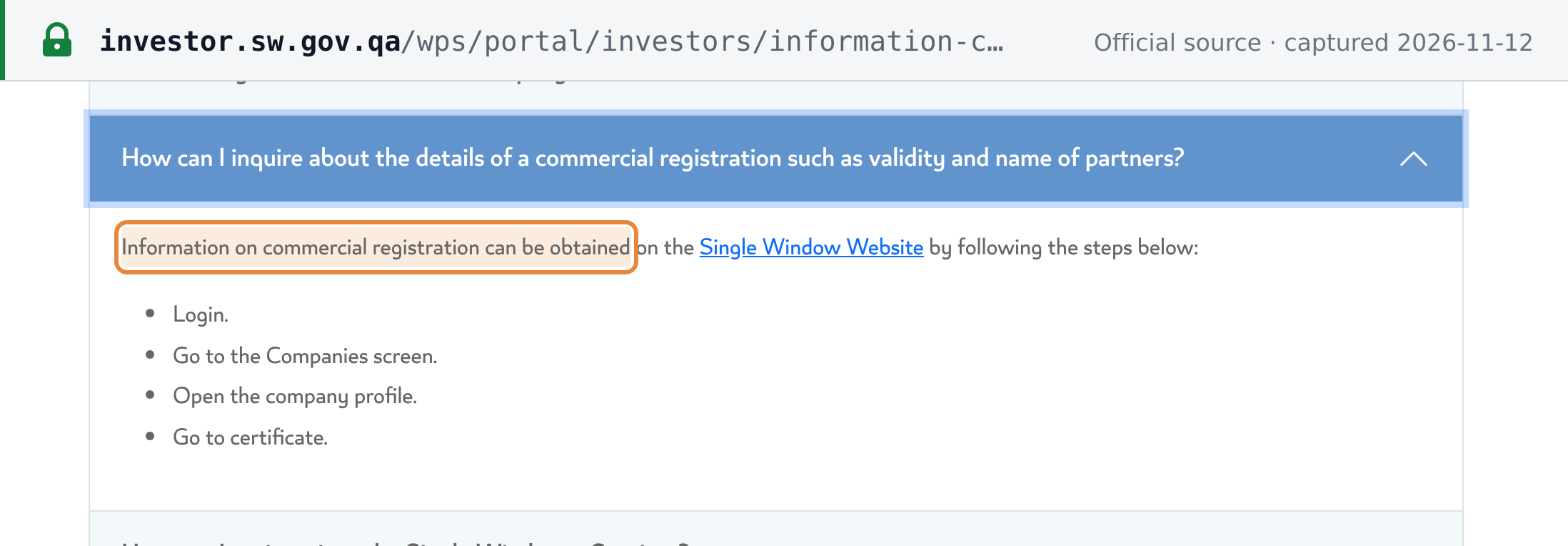
- The CR details and extract need a Single Window login. The Single Window FAQ: "How can I inquire about the details of a commercial registration such as validity and name of partners? Information on commercial registration can be obtained on the Single Window Website by following the steps below: Login. Go to the Companies screen. Open the company profile. Go to certificate." Registration "can be made through the National Authentication Services (NAS), Qatar’s online service provider, using your Qatar identification card." [3] The Single Window login also offers "Login with Smart Card" and "Log in with QDI" (Qatar Digital Identity). [11] Either way, a login shows only the companies on your own account.
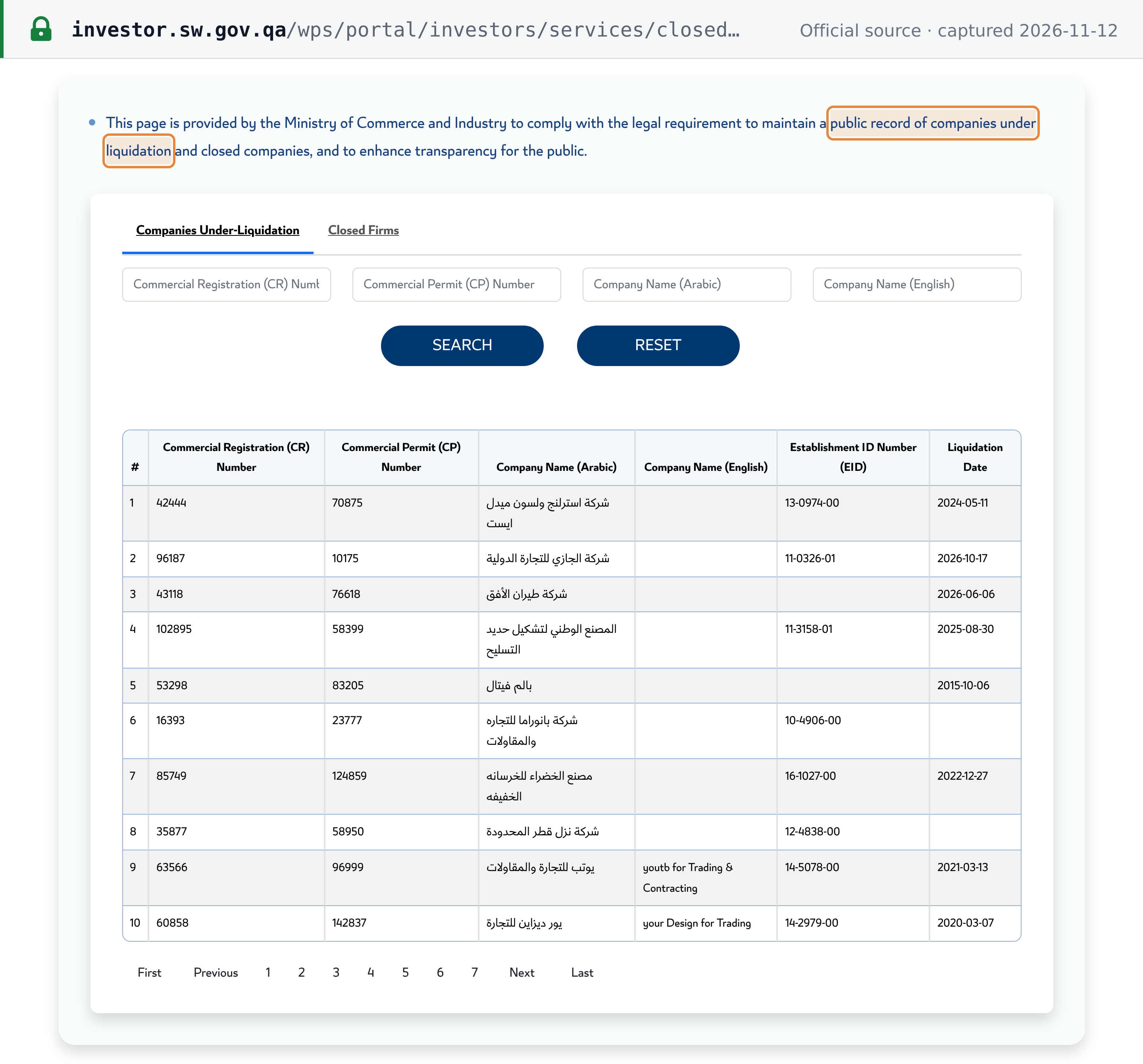
- The register of under-liquidation and closed firms is public. MOCI: "This page is provided by the Ministry of Commerce and Industry to comply with the legal requirement to maintain a public record of companies under liquidation and closed companies, and to enhance transparency for the public." [4] It loaded without a login or CAPTCHA on 2026-11-12. If a search does not complete, for example because you searched too often, it shows "Rate Limit Exceeded … You have made too many requests in a short time. Please wait and try again." MOCI shows this message for any failed search. It says nothing about the CR.
 Source snapshot captured 2026-11-12 — original
 Source snapshot captured 2026-11-12 — original
How to verify a Qatar CR number
Step 1: get the company's online CR extract
- Ask the company for its online commercial registration extract, printed from the Single Window. The company prints it itself. The Single Window FAQ: "To request an excerpt of the commercial registration: Login to Single Window Website . Go to and press on company name. Go to certificate. Print copy." [3]
- Compare the extract with your documents. Check that the company name and CR number on the extract match your contract, invoice or offer letter, and that its validity date has not passed. If it has, ask for a current extract.
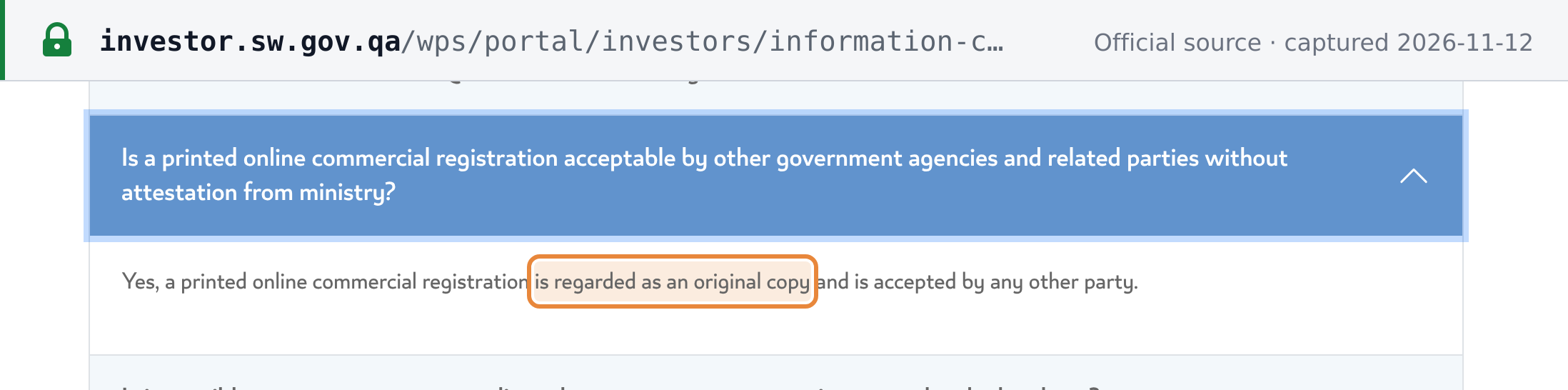
MOCI treats the printout as an original: "Yes, a printed online commercial registration is regarded as an original copy and is accepted by any other party." [3]
 Source snapshot captured 2026-11-12 — original
Step 2: check that the CR is not in liquidation or closed
- Open MOCI's Public Register for Under-Liquidation & Closed Firms at https://investor.sw.gov.qa/wps/portal/investors/services/closed-firms. No login is needed.
- Search the "Companies Under-Liquidation" tab. Type the CR number into the "Commercial Registration (CR) Number" field, with no spaces, and click Search. Type the CR exactly as printed on the extract, including any "/" suffix such as /2. The search matches whole numbers only: 27533 does not find 27533/2, and a partial number finds nothing. The other fields are "Commercial Permit (CP) Number", "Company Name (Arabic)" and "Company Name (English)".
- Repeat on the "Closed Firms" tab. It has its own search fields. Type the CR number into "Commercial Registration (CR) Number" again and click Search.
- Read the result (see the table below). A hit means the CR is in liquidation or closed. No hit on both tabs means only that the CR is not on this register.
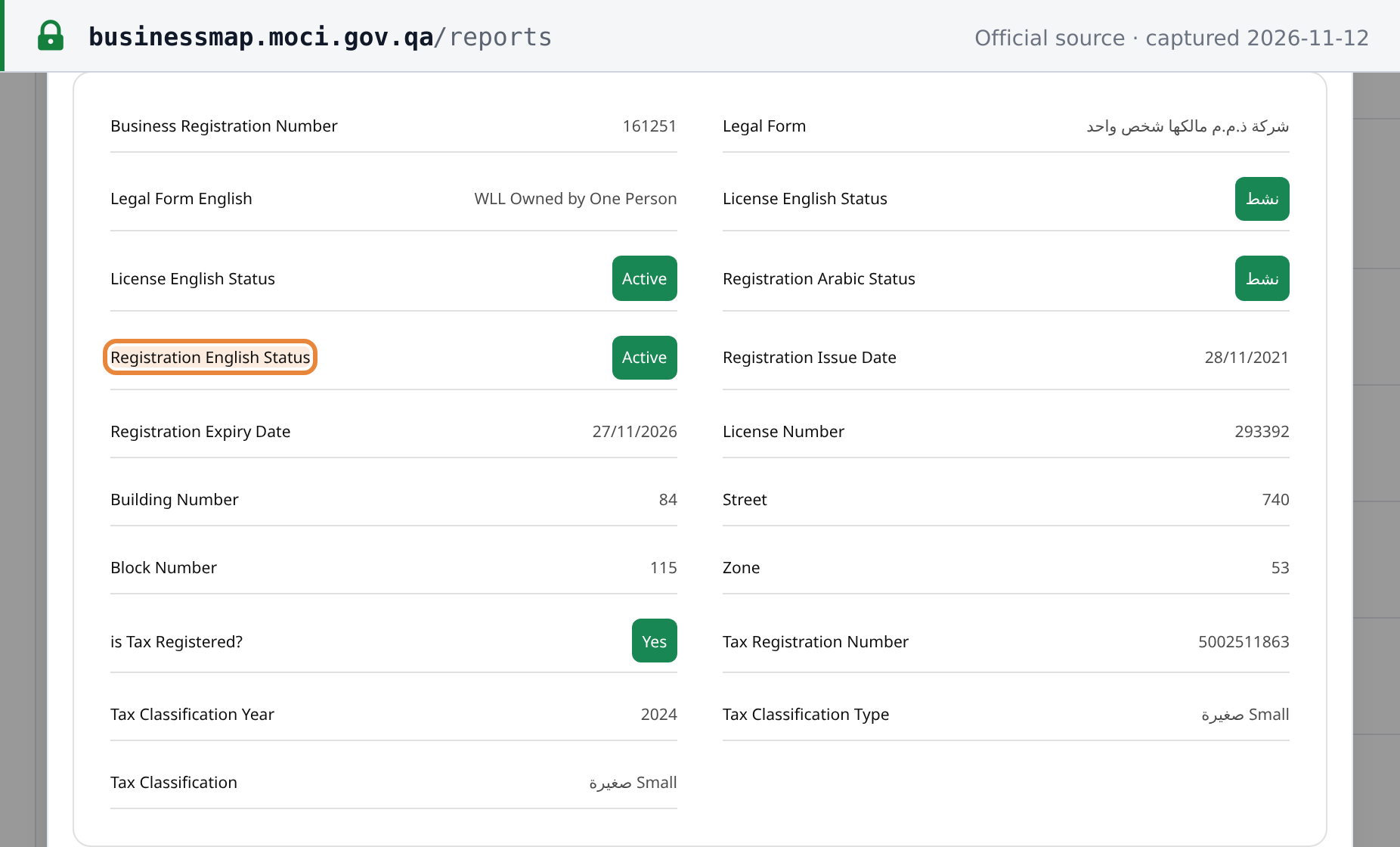
- Optional: check the registration status on the Qatar Business Map. If you have the company's commercial licence (CP) number, open Reports > All Commercial Registrations on MOCI's Qatar Business Map, type it into "License Number", and check that the "Business Registration Number" shown is the CR you were given and that "Registration Status" is Active. View Details shows the "Registration Expiry Date". Do not type a CR number into License Number: it can match a different company's licence. The Business Map does not show liquidation, so still search the register above: a company in liquidation can show there only as "Expired".
 Source snapshot captured 2026-11-12 — original
Step 3 (optional): check the trade name
- Search the company's name in the Single Window's Trade Name Search or MOCI's Trade Names Search. The Single Window asks for "a search string that consists of least four characters. You may query by either Arabic or English or both in one search query." [12] MOCI: "All trade names displayed in the search results are reserved and protected by law." [5] A hit shows only that the name is reserved. The results show no CR number and no status, so this is not a CR check.
Not a CR lookup: the Ministry of Interior company ID inquiry
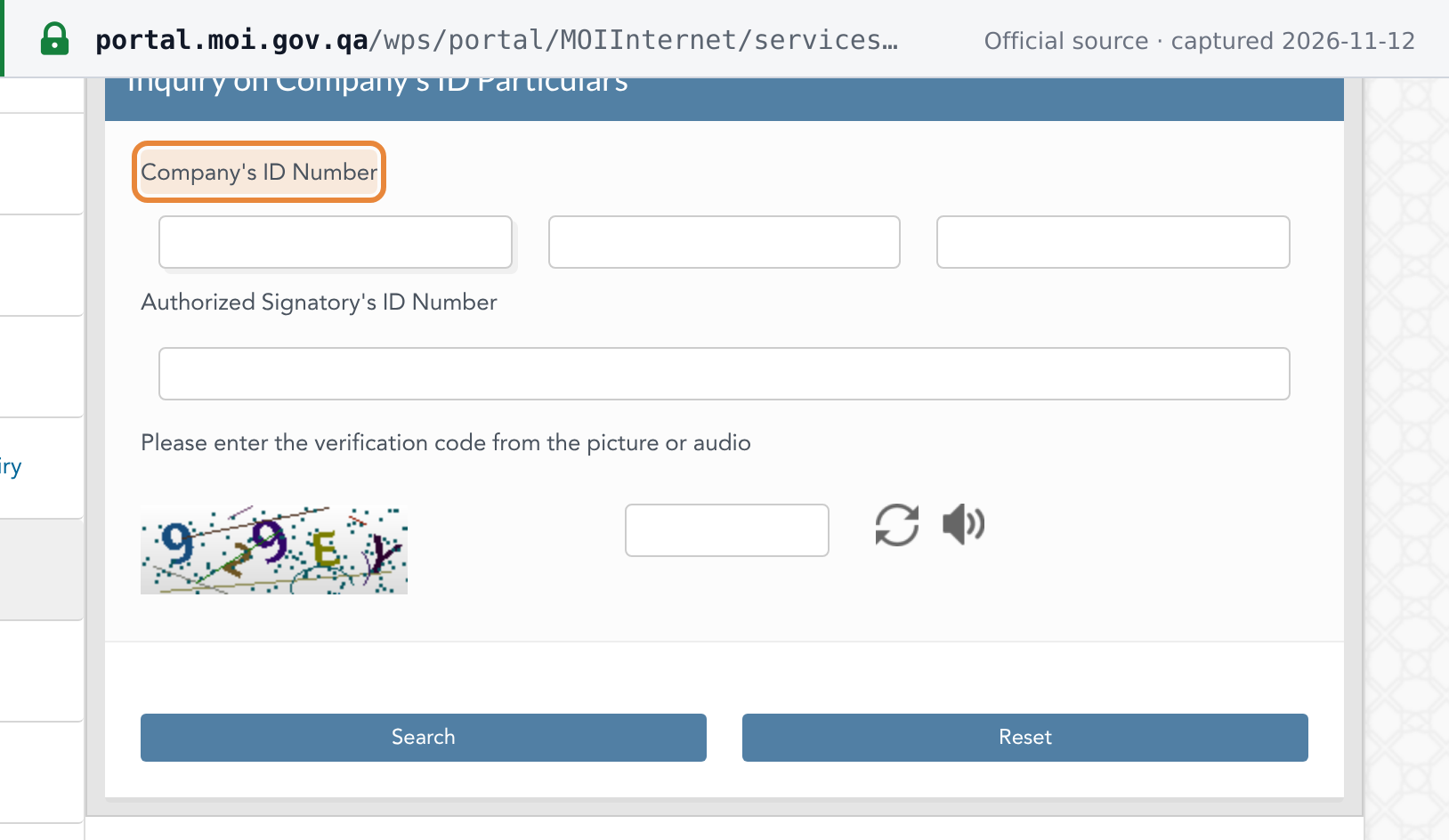
The Ministry of Interior's Inquiry on Company's ID Particulars does not take a CR number. It asks for the "Company's ID Number" (three boxes of 2, 4 and 2 digits), the "Authorized Signatory's ID Number" (an 11-digit QID) and a verification code "from the picture or audio". [6] It suits someone who already holds the company's establishment ID and the signatory's QID.
 Source snapshot captured 2026-11-12 — original
Not the registrar: the Qatar Chamber directory (qatarcid.com)
qatarcid.com is the Qatar Chamber's Commercial & Industrial Directory. It can help you find a company's address or contact details, but it is not MOCI's register. Qatar Chamber says the directory "is designed to enable companies to create their own profiles", and a company finds its listing "by C.R Number or Chamber Membership Number" and then claims it. [7] A missing listing does not mean a CR is invalid, and a listing does not prove a CR is current. For the Chamber's membership number, see how to verify a Qatar Chamber (QCCI) membership.
What the result tells you
| Result | What it means |
|---|---|
| CR extract with a validity date that has not passed | The CR was current when the extract was printed. Compare the name, CR number and partners with your documents. |
| CR extract with a validity date that has passed | The CR has not been renewed, or the extract is old. Ask for a current one. |
| A row on "Companies Under-Liquidation" | The company is in liquidation. The row shows its CR number, CP number, Arabic and English names, establishment ID and "Liquidation Date". |
| A row on "Closed Firms" | The CR is closed or the commercial permit is cancelled. The row shows the "CR Closure Date" or "CP Cancellation Date". |
| "No companies match the selected criteria." on both tabs | The CR is not on MOCI's register of under-liquidation and closed firms. This does not prove the CR is active, valid or renewed. Rely on the CR extract for that. |
| Business Map: "Registration Status" Active, with the CR you were given as "Business Registration Number" | The registration is active. Check the "Registration Expiry Date" under View Details. |
| Business Map: "Registration Status" Expired | The registration has lapsed. It may also be in liquidation: search the register of under-liquidation and closed firms. |
| "Rate Limit Exceeded" | The search did not complete (MOCI shows this message for any failed search). Wait and search again. |
Sources: the register's tabs, columns and messages [4], the Qatar Business Map [13] and the Single Window FAQ [3], as at 2026-11-12.
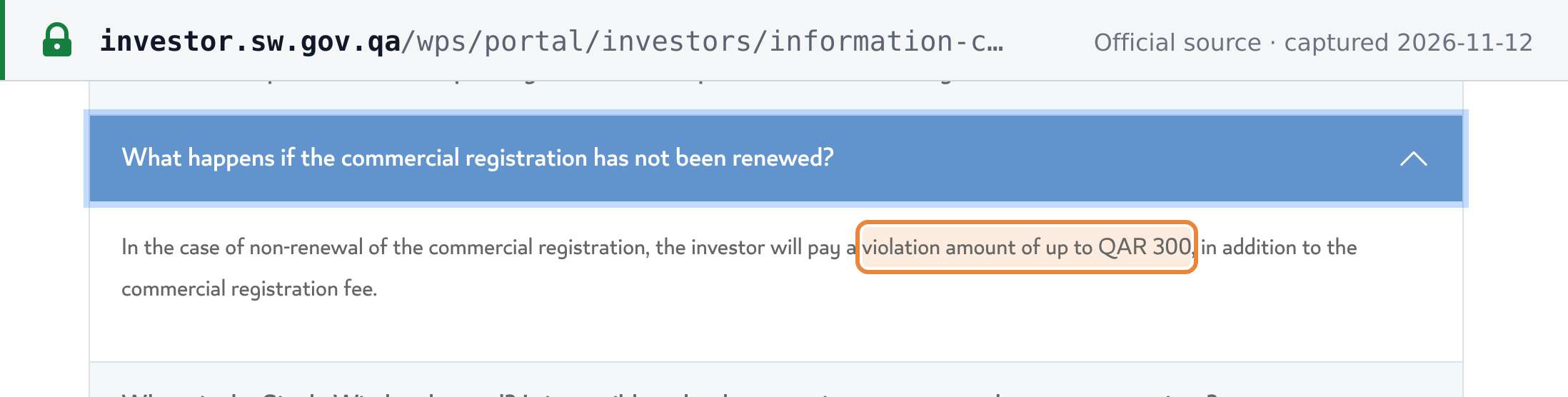
Renewal. MOCI tells businesses to "Renew the commercial register and trade licenses 30 days before expiry." [8] Its Procedures Manual (April 2023) notes that "The register may be renewed for a period of five years." [9] The Single Window FAQ says not renewing costs "a violation amount of up to QAR 300, in addition to the commercial registration fee" (as at 2026-11-12). [3]
 Source snapshot captured 2026-11-12 — original
Qatar CR number format
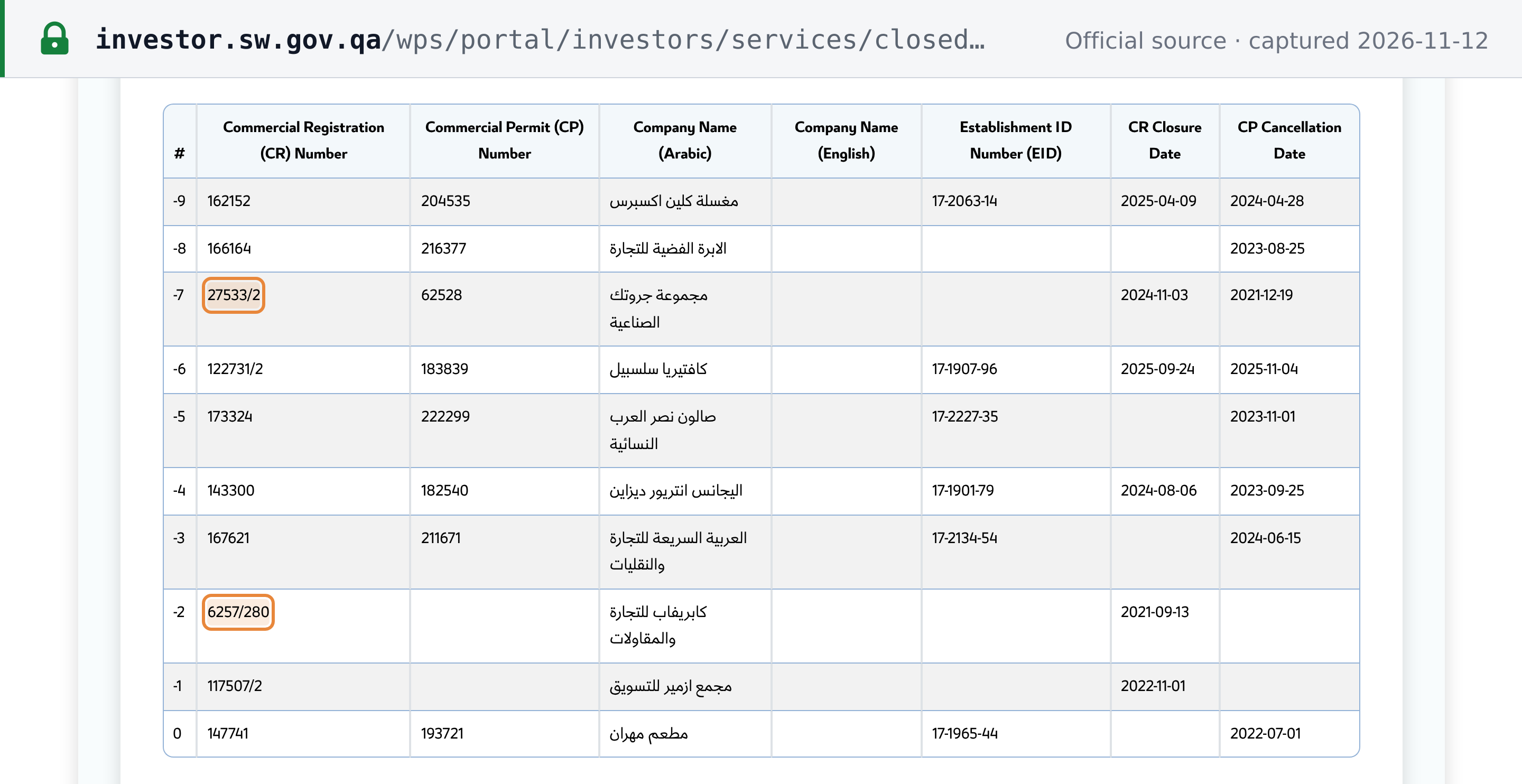
MOCI publishes no format rule or check-digit algorithm for CR numbers. As at 2026-11-12 none appears on its investor pages, its Single Window FAQs and help articles, or its April 2023 Procedures Manual. On MOCI's own register of under-liquidation and closed firms, most CR numbers appear as plain numbers of up to six digits, such as 16393 and 102895, with no leading zeros. Some carry a slash and a suffix, such as 27533/2 or 6257/280. [4] This is how MOCI displays them, not a published rule.
The same register keeps three numbers apart: the CR number, the Commercial Permit (CP) number (five or six digits there) and the Establishment ID Number (EID), shown in the form 13-0974-00. The CR number is also printed on the company's tax card: the State of Qatar's TIN sheet for the OECD says the tax card includes "the CR number or the license number of the taxpayer". [10] The tax identification number (TIN) is a different number; see our Qatar Tax ID Guide.
 Source snapshot captured 2026-11-12 — original
Common false negatives
- Wrong number in the CR field. A CP (trade licence) number or an establishment ID typed into "Commercial Registration (CR) Number" will not match. They are separate columns on MOCI's register.
- Leading zeros or spaces. MOCI shows CR numbers without leading zeros, and a zero-padded number finds nothing on the register. If a number reaches you with leading zeros, search it without them.
- Missing suffix. Some CRs end in a slash and a number (27533/2). Without the suffix the search finds nothing.
- CR typed into the Business Map's License Number. The Business Map searches by commercial licence (CP) number. A CR typed there can match a different company's licence.
- Only one tab searched. The two tabs of the register have separate search fields. Search the CR on both "Companies Under-Liquidation" and "Closed Firms".
- No hit read as "active". The register lists only companies under liquidation and closed firms. No hit there proves nothing about whether a CR is current.
- Wrong registry. A firm licensed in the Qatar Financial Centre comes under the Qatar Financial Centre Authority (QFCA), not MOCI's commercial register. The State of Qatar's TIN sheet for the OECD says "All QFC licensed entities are required to complete their Tax Registration" with the QFC Tax Department. [10]
- Directory gaps. qatarcid.com holds the profiles companies create and claim, so a missing listing says nothing about the CR. [7]
- Rate limit. "Rate Limit Exceeded" means the search did not complete. It is not a result. Wait and search again.
Related resources
- Qatar indirect tax guide: Qatar's taxes and the GTA.
- Qatar Tax ID Guide: the TIN, which is separate from the CR number.
- Qatar TIN validator: check a Qatar TIN (not a CR number).
- How to verify a Qatar Chamber (QCCI) membership.
- Qatar tax changes: dated changes to Qatar's tax rules.
Frequently Asked Questions
Is there a public MOCI website where I can type a Qatar CR number and see whether the company is active?
Not by CR number, as at 2026-11-12. MOCI's E-Services page, its Services Hub, its Qatar Business Map and the Single Window search tools (Trade Name Search, Business Activities Search, Business Setup Advisor, and the register of under-liquidation and closed firms) offer no public search that takes a CR number and returns an active CR's details. MOCI's Qatar Business Map does show a registration's status, expiry date and CR number, but you search it by the commercial licence (CP) number, not the CR number. The Single Window shows "the details of a commercial registration such as validity and name of partners" only after you log in and open the company from your own Companies screen, and Single Window registration goes through the National Authentication Services (NAS) "using your Qatar identification card". So a supplier, customer or job candidate outside the company cannot pull the record by CR number. Ask the company for its online CR extract printed from the Single Window, which MOCI says "is regarded as an original copy and is accepted by any other party", then search its CR number on MOCI's Public Register for Under-Liquidation & Closed Firms. If you have the CP number, you can also check the registration status on the Business Map. [1][2][3]
A company is not on qatarcid.com. Does that mean its CR is not valid?
No. qatarcid.com is the Qatar Chamber's Commercial & Industrial Directory, not MOCI's commercial register. Qatar Chamber says the directory "is designed to enable companies to create their own profiles": a company finds its listing "by C.R Number or Chamber Membership Number" and then claims it. A company that has never claimed or completed a profile can still hold a valid MOCI CR. A listing does not prove that a CR is current either. Use the company's CR extract and MOCI's register of under-liquidation and closed firms instead. [1][2]
What is the difference between the CR number, the CP number, the establishment ID and the Qatar Chamber membership number?
They are four different numbers. MOCI's public register of under-liquidation and closed firms shows three of them in separate columns: "Commercial Registration (CR) Number", "Commercial Permit (CP) Number" and "Establishment ID Number (EID)". On that register, as at 2026-11-12, CR numbers appear as numbers such as 16393, 102895 or 27533/2, and establishment IDs in the form 13-0974-00. The Chamber membership number belongs to the Qatar Chamber, whose directory can be searched by "C.R Number or Chamber Membership Number". Type the CR number into a CR field: a CP number or an establishment ID typed there will not match. [1][2]
Can I check a Qatar company on the Ministry of Interior's website with its CR number?
No. The Ministry of Interior's "Inquiry on Company's ID Particulars" asks for the "Company's ID Number" (typed into three boxes of 2, 4 and 2 digits), the "Authorized Signatory's ID Number" (an 11-digit QID) and a verification code "from the picture or audio". It has no field for a CR number. It suits someone who already holds the company's establishment ID and the signatory's QID, not a third party who has only a CR number. [1]
The counterparty says it is licensed in the Qatar Financial Centre. Why can I not find it with MOCI's tools?
QFC firms are licensed in the Qatar Financial Centre and come under the Qatar Financial Centre Authority (QFCA). The State of Qatar's TIN sheet for the OECD treats them separately: "All QFC licensed entities are required to complete their Tax Registration", and the QFC Tax Department issues their TIN. Ask a QFC firm for its QFC licence details and check them with the Qatar Financial Centre, not with MOCI's commercial registration tools. [1]
What happens if a Qatar CR has expired or has not been renewed?
MOCI tells businesses to "Renew the commercial register and trade licenses 30 days before expiry", and its Procedures Manual (April 2023) notes that "The register may be renewed for a period of five years." The Single Window FAQ says that if a CR is not renewed, "the investor will pay a violation amount of up to QAR 300, in addition to the commercial registration fee" (as at 2026-11-12). Check the validity date on the CR extract you are given. If it has passed, ask for a current extract. MOCI's register of under-liquidation and closed firms shows only whether a CR is in liquidation or closed, not whether it has lapsed. [1][2][3]
Is there a check digit or fixed format I can validate a Qatar CR number against in software?
No. As at 2026-11-12, MOCI publishes no format rule or check-digit algorithm for CR numbers on its investor pages, its Single Window FAQs and help articles, or its April 2023 Procedures Manual. On MOCI's own register of under-liquidation and closed firms, CR numbers appear as numbers of up to six digits with no leading zeros, such as 16393 and 102895, and some carry a slash suffix such as 27533/2. A software check can reject empty input or characters other than digits and "/", but it cannot tell a live CR from a closed one. Confirm a CR with the company's CR extract and MOCI's register. [1]
How Lookuptax can help you check tax IDs?
Lookuptax validates VAT and tax ID numbers through one API. It checks each number's format and, where an official lookup is available, its registration status against the official source. MOCI offers no public lookup by CR number, so Lookuptax does not validate Qatar CR numbers.