How to verify GST in Canada?
Check a GST/HST number on the CRA's GST/HST Registry
The Canada Revenue Agency (CRA) runs a free GST/HST Registry. The CRA says to use it "to confirm that the business charging you GST/HST is registered", so that "your claims for input tax credits only include GST/HST charged by someone who is registered for GST/HST". [1]
- Free, no sign-in. "The GST/HST Registry is a free service." The search form asks for no login and shows no CAPTCHA (as at 2026-11-05). [1]
- Three inputs, one result. A search needs the GST/HST number, the business name and the transaction date. You get one answer per search, for that date. The CRA's terms of use say the registry "is not intended to be a search engine", so you cannot browse or search by name alone. [2]
- Terms of use. The CRA's route to the form goes through its terms and conditions of use, which say: "Use the GST/HST Registry only to validate the GST/HST number of a business. Any commercial reproduction of the registry results is strictly prohibited." [2]
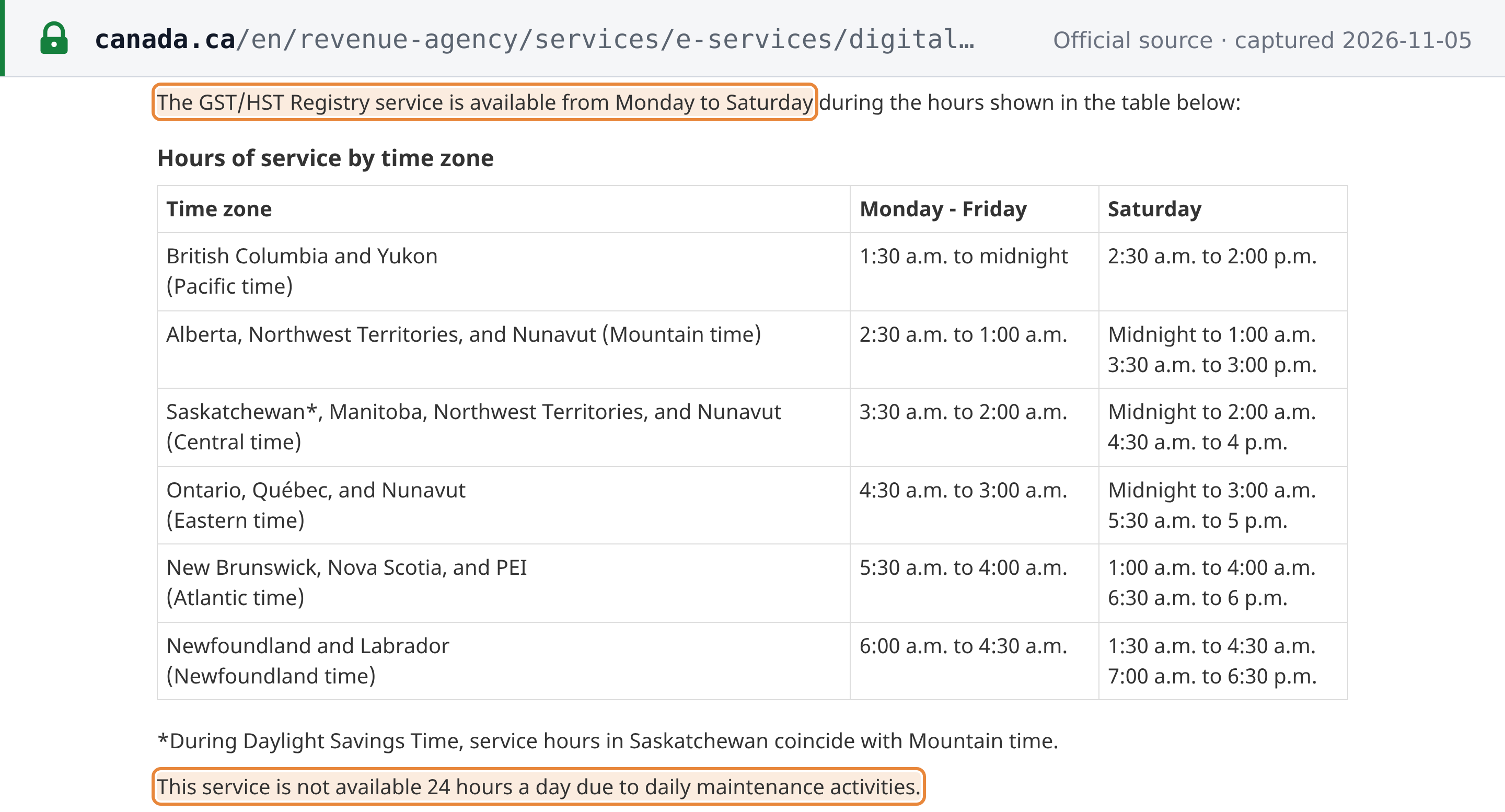
- Fixed hours, no Sundays. "The GST/HST Registry service is available from Monday to Saturday" at set hours, and "is not available 24 hours a day due to daily maintenance activities". In Eastern time that is 4:30 a.m. to 3:00 a.m. Monday to Friday, and midnight to 3:00 a.m. and 5:30 a.m. to 5 p.m. on Saturday (CRA hours table, as at 2026-11-05). A search that fails outside these hours says nothing about the number. [3]
- One search at a time. Each search checks one number, under one name, for one date. The CRA's registry pages (the entry page, terms of use, hours of service and FAQ) state no limit on the number of searches (as at 2026-11-05).
 Source snapshot captured 2026-11-05 — original
 Source snapshot captured 2026-11-05 — original
How to verify a GST/HST number
Step 1: Open the CRA GST/HST Registry
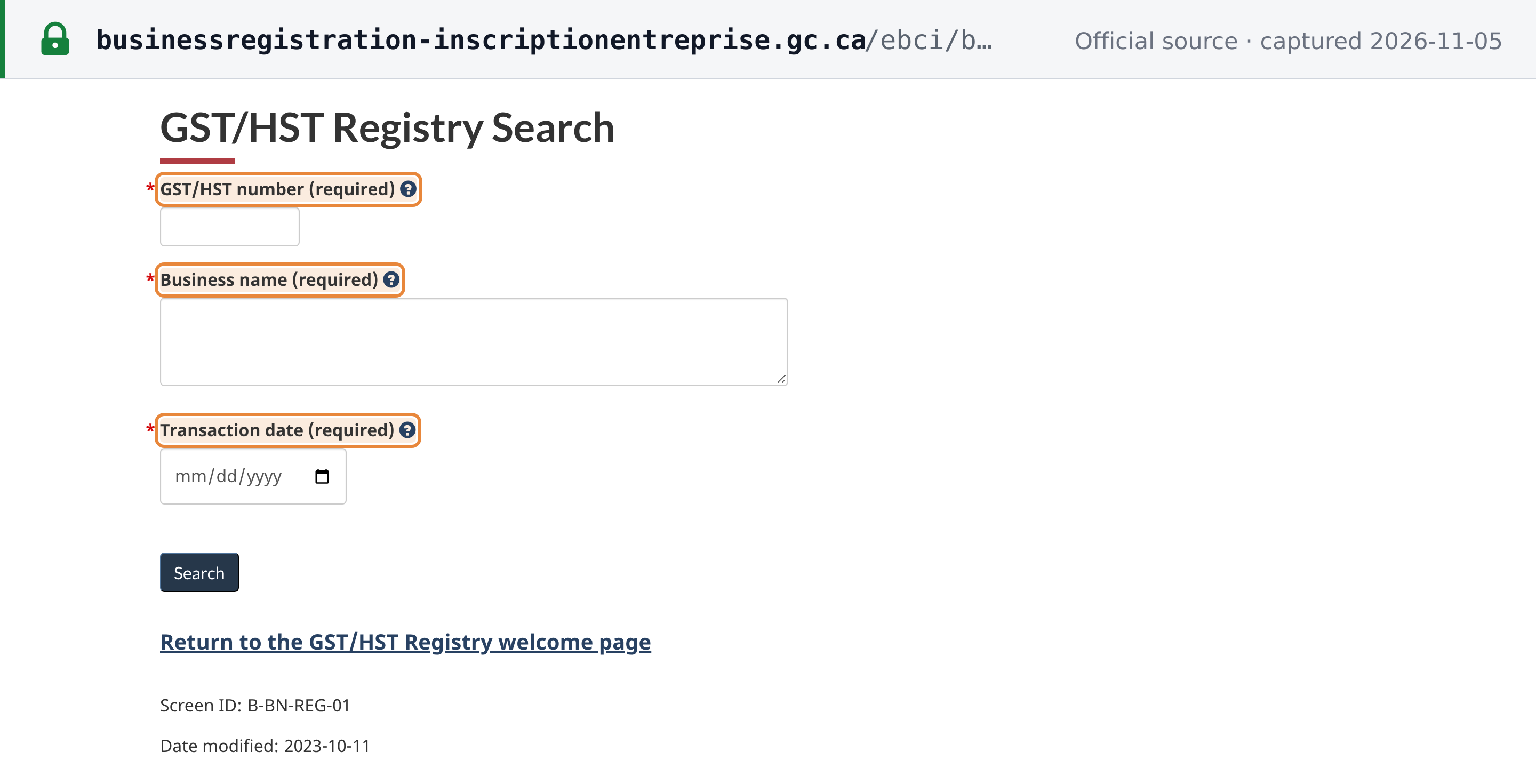
Go to the CRA page Confirming a GST/HST account number and select Search now, which leads to the GST/HST Registry Search form. On the way, the CRA shows its terms and conditions of use, with I agree and Quit buttons. No sign-in is needed.
The CRA page is Confirming a GST/HST account number on canada.ca. The search form itself is at businessregistration-inscriptionentreprise.gc.ca (pictured above).
Step 2: Enter the GST/HST number
Enter only the first nine digits of the GST/HST number, which are the supplier's business number. Leave out the letters and the last four digits: enter 119278877, not 119278877RT0001.
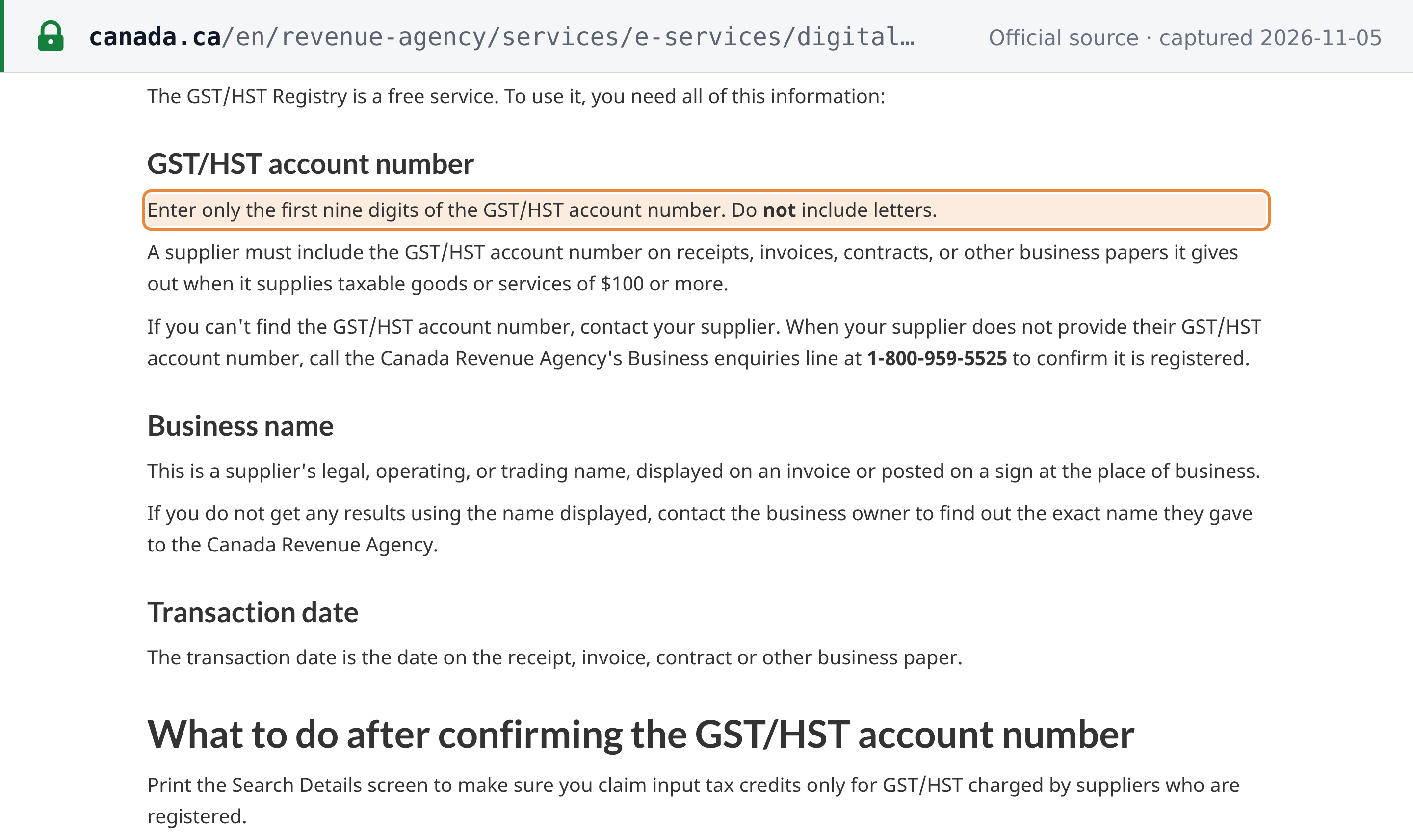
The CRA's instruction is: "Enter only the first nine digits of the GST/HST account number. Do not include letters." [1] The form's own help adds that this is the number "displayed on the invoice from your supplier" and is "not a social insurance number, consumer number or certificate number". [4] The field stops at nine characters, so a pasted 119278877RT0001 is cut to 119278877, while a number pasted with spaces is rejected.
Step 3: Enter the business name and the transaction date
Enter the supplier's legal, operating or trading name as the supplier gave it to the CRA, and the transaction date, which is the date on the receipt, invoice, contract or other business paper. The date cannot be in the future.
The CRA describes the business name as "a supplier's legal, operating, or trading name, displayed on an invoice or posted on a sign at the place of business", and adds: "If you do not get any results using the name displayed, contact the business owner to find out the exact name they gave to the Canada Revenue Agency." [1] The registry ignores capital letters and full stops in the name, but does not match a partial name or the same words in another order (as at 2026-11-05). A blank date is rejected with "Transaction date must be entered." and a future one with "Transaction date cannot be a future date." [4]
 Source snapshot captured 2026-11-05 — original
Step 4: Select Search and read the result
A match shows GST/HST number registered on this transaction date. The other two answers are GST/HST number was not registered on this transaction date, and Insufficient information entered, which means the details you entered do not match the CRA's file. Print the Search Details screen for your records.
A successful search opens the GST/HST Registry Search Result screen, which lists the GST/HST number, the business name and the transaction date you entered, and the result "GST/HST number registered on this transaction date.", with Print, Search again and Previous buttons (as at 2026-11-05). For example, 119278877 with the name University of Ottawa and a November 2026 date returns that result. [4] The CRA's advice for afterwards: "Print the Search Details screen to make sure you claim input tax credits only for GST/HST charged by suppliers who are registered." [1]
What each result means
The registry gives three answers after a search, and the form can also refuse the input before searching. They mean different things:
- "GST/HST number registered on this transaction date." The CRA's records show the number, under that name, as registered on the date you entered.
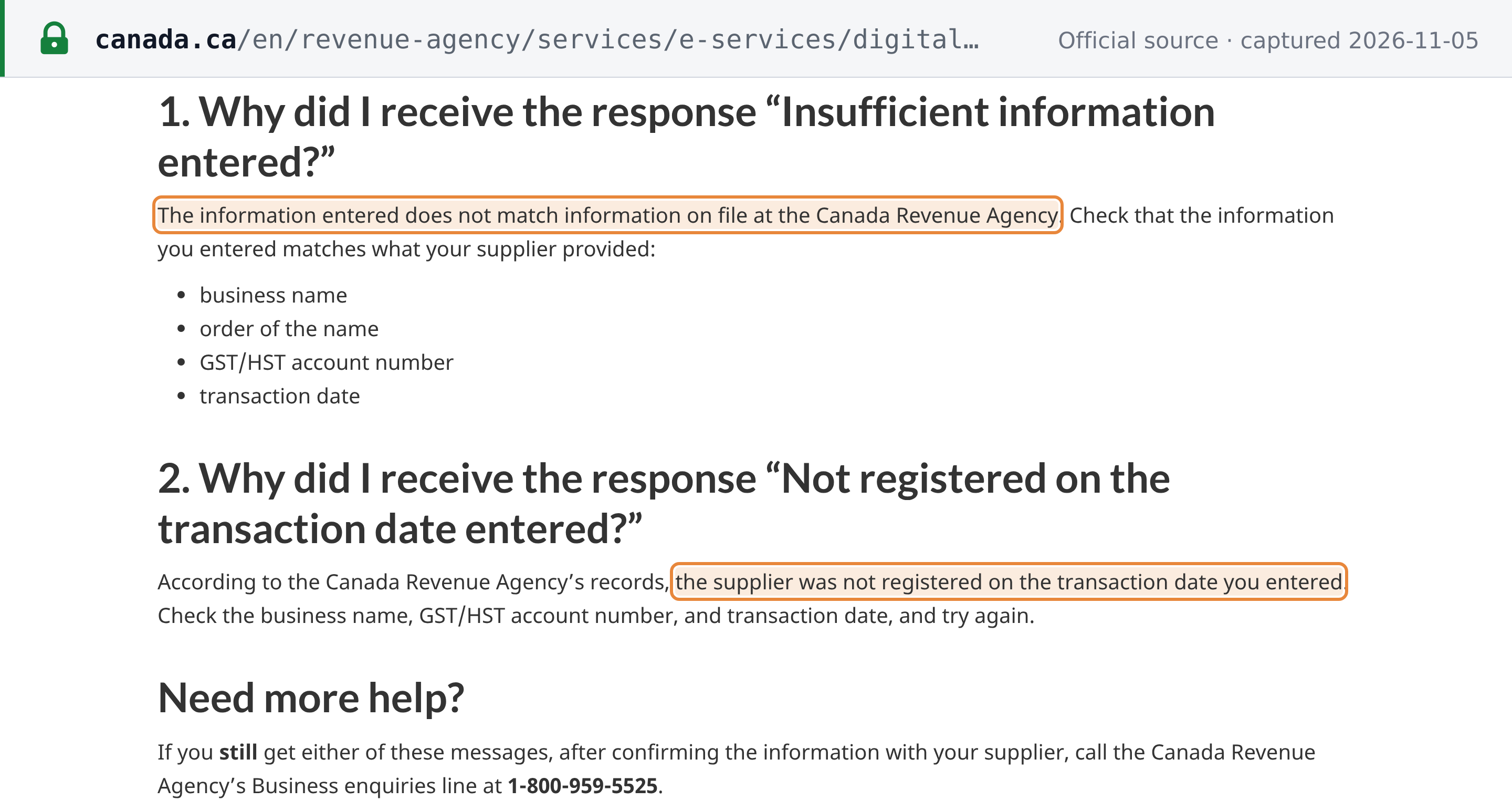
- "GST/HST number was not registered on this transaction date." The CRA's FAQ explains: "According to the Canada Revenue Agency’s records, the supplier was not registered on the transaction date you entered." The number and name matched, but not the date. For example, University of Ottawa's
119278877returns this answer for a 1985 date (as at 2026-11-05). [5] - "Insufficient information entered." The CRA's FAQ explains: "The information entered does not match information on file at the Canada Revenue Agency." It asks you to check the business name, the order of the name, the GST/HST number and the transaction date. [5] This is not a statement that the number is unregistered: a registered number with the wrong name, and a well-formed number that belongs to nobody, both get this same message (as at 2026-11-05). None of the registry's messages says that a number does not exist (as at 2026-11-05).
- "GST/HST number is not valid." The form refused the number before any search. With fewer than nine digits, letters or spaces, it also shows "GST/HST number must be 9 numeric digits." (as at 2026-11-05). [4]
If you still get "Insufficient information entered." or "not registered" after confirming the details with your supplier, the CRA says to call its Business enquiries line at 1-800-959-5525. The same line confirms registration when a supplier does not give you its number at all. [1] [5]
 Source snapshot captured 2026-11-05 — original
GST/HST number format
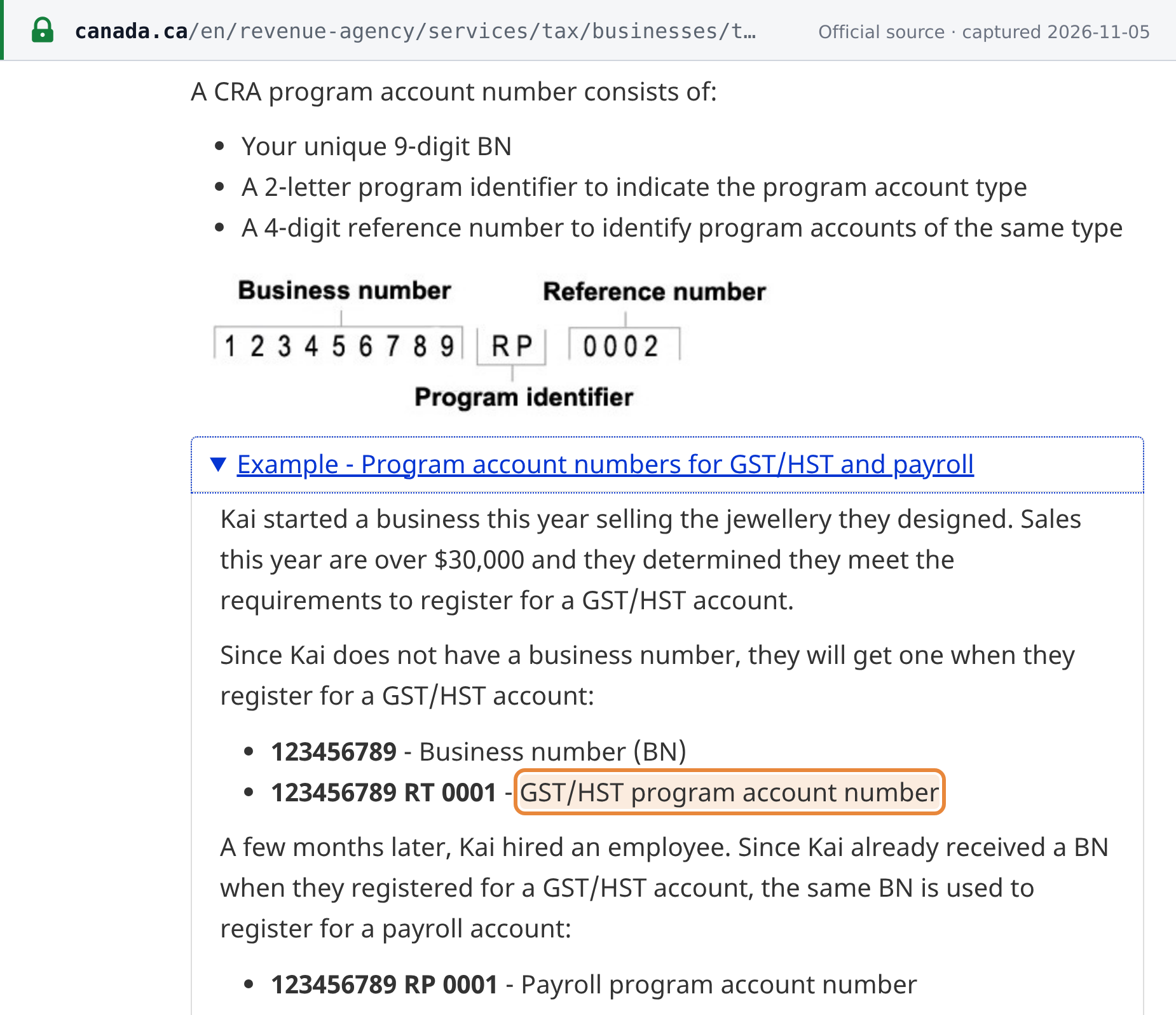
A GST/HST number is the business's 9-digit business number (BN), followed by the program identifier RT and a 4-digit reference number, for example 123456789 RT 0001. The CRA's guide RC4022 puts it this way: "The 9-digit BN identifies the business followed by 2 letters which identifies the program (RT is for the GST/HST program) and a 4 digit number which identifies the specific account". [6] Only the 9-digit BN goes into the registry. A business has only one BN, and its other CRA accounts (payroll RP, for example) share the same nine digits. [7] The Canada Tax ID Guide covers Canada's other tax identifiers.
 Source snapshot captured 2026-11-05 — original
The registry checks more than the length: it rejects some nine-digit numbers, 123456789 among them, as "GST/HST number is not valid." before looking anything up, while other nine-digit numbers pass to a search (as at 2026-11-05). The CRA's registry pages and the form's help do not describe the check it applies, so a number that passes the form can still belong to nobody. Only a "registered" result confirms it. [4]
Common false negatives
A result other than "registered" does not always mean the supplier is unregistered. Check these first:
- The name differs from the one the supplier gave the CRA. An invoice can carry a trading name the CRA does not hold for that number, or the words in another order. Ask the supplier for "the exact name they gave to the Canada Revenue Agency". [1]
- A typo in the number. A well-formed wrong number gets "Insufficient information entered.", the same message as a name mismatch, so re-read the nine digits against the invoice.
- The letters or spaces were typed in. The field takes nine digits only. Drop
RT0001and any spaces. - The transaction date is before the registration. The registry answers for the date you enter. Use the invoice date, not a date from before the supplier registered.
- The business changed its legal form. RC4022: "If the legal status of your business ownership changes, you have to get a new BN with a new GST/HST account for the new legal entity (for example, when a business changes from a sole proprietorship to a partnership, or a partnership changes to a corporation)." An old number on the new entity's invoice will not match. [6]
- The CRA's records have not caught up. "Information on the GST/HST Registry is as up-to-date as Canada Revenue Agency (CRA) records." The registry's terms and FAQ do not say how long a new registration takes to appear (as at 2026-11-05). [2]
- It is a QST number. A Quebec sales tax number is not on the GST/HST Registry: "To confirm a QST number, go to Revenu Québec." See how to verify a QST number. [1]
Simplified GST/HST registrants
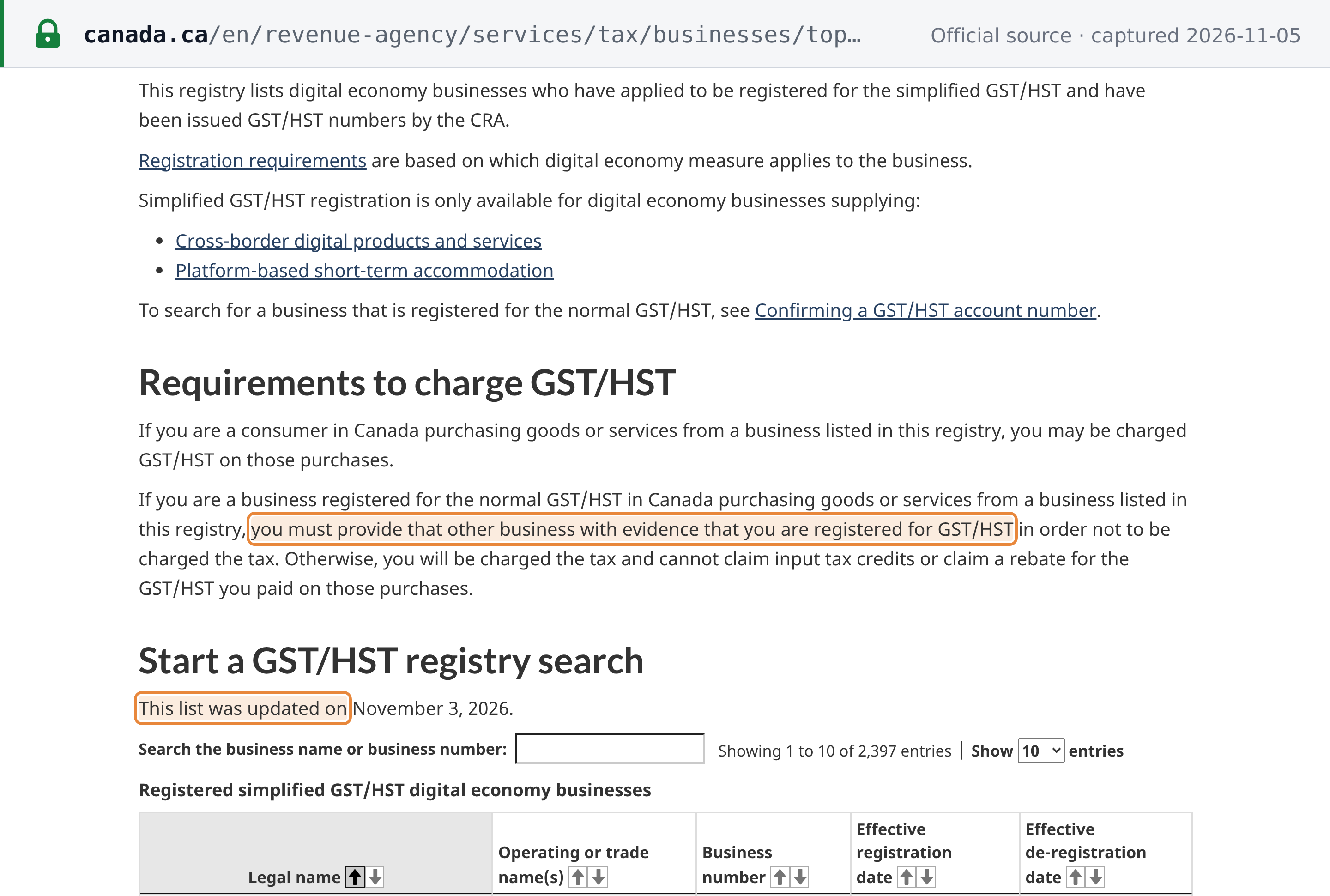
Non-resident digital businesses can register for the simplified GST/HST instead of the normal GST/HST. The CRA says simplified registration "is only available for digital economy businesses supplying" cross-border digital products and services, or platform-based short-term accommodation. The CRA lists them on a separate Simplified GST/HST Registry, searchable by business name or number. As at 2026-11-05 that page says "This list was updated on November 3, 2026.". [8]
A "registered" result on the normal registry does not tell you which kind of registrant you are dealing with. The result screen does not show the program account suffix, and Simplified registrants are found there too. Google Asia Pacific Pte. Ltd., for example, is on the Simplified list under 700561103, and the normal registry returns "GST/HST number registered on this transaction date." for that number and name on a November 2026 date (as at 2026-11-05). To know whether a supplier is a Simplified registrant, search the Simplified list.
It matters to a GST/HST-registered buyer. The CRA says that if you are registered for the normal GST/HST and buy from a business on the Simplified list, "you must provide that other business with evidence that you are registered for GST/HST in order not to be charged the tax. Otherwise, you will be charged the tax and cannot claim input tax credits or claim a rebate for the GST/HST you paid on those purchases." [8]
 Source snapshot captured 2026-11-05 — original
Related resources
- Canada GST/HST guide: rates, registration, invoicing and filing rules
- Canada Tax ID Guide: Canada's tax identifiers and their formats
- How to verify a QST number and how to verify a PST number: the provincial sales tax numbers
- Canada tax changes: dated GST/HST changes
- Canada GST/HST number validator: check a GST/HST number's format instantly
Frequently Asked Questions
Why does the GST/HST Registry ask for a business name and a transaction date, not just the number?
The registry answers one question: was this named business registered for GST/HST on this date? The CRA says you need all three items to use it, and its terms add that the registry “is not intended to be a search engine”. Because the answer is given for the date you enter, it tells you whether the supplier was registered when the invoice was issued, not only today. The name can be the supplier’s legal, operating or trading name, but it has to match what the supplier gave the CRA. The registry accepts a name typed in lower case or without full stops, but not a partial name or the words in a different order (as at 2026-11-05). [1] [2]
Which provinces charge HST, and does one number cover both GST and HST?
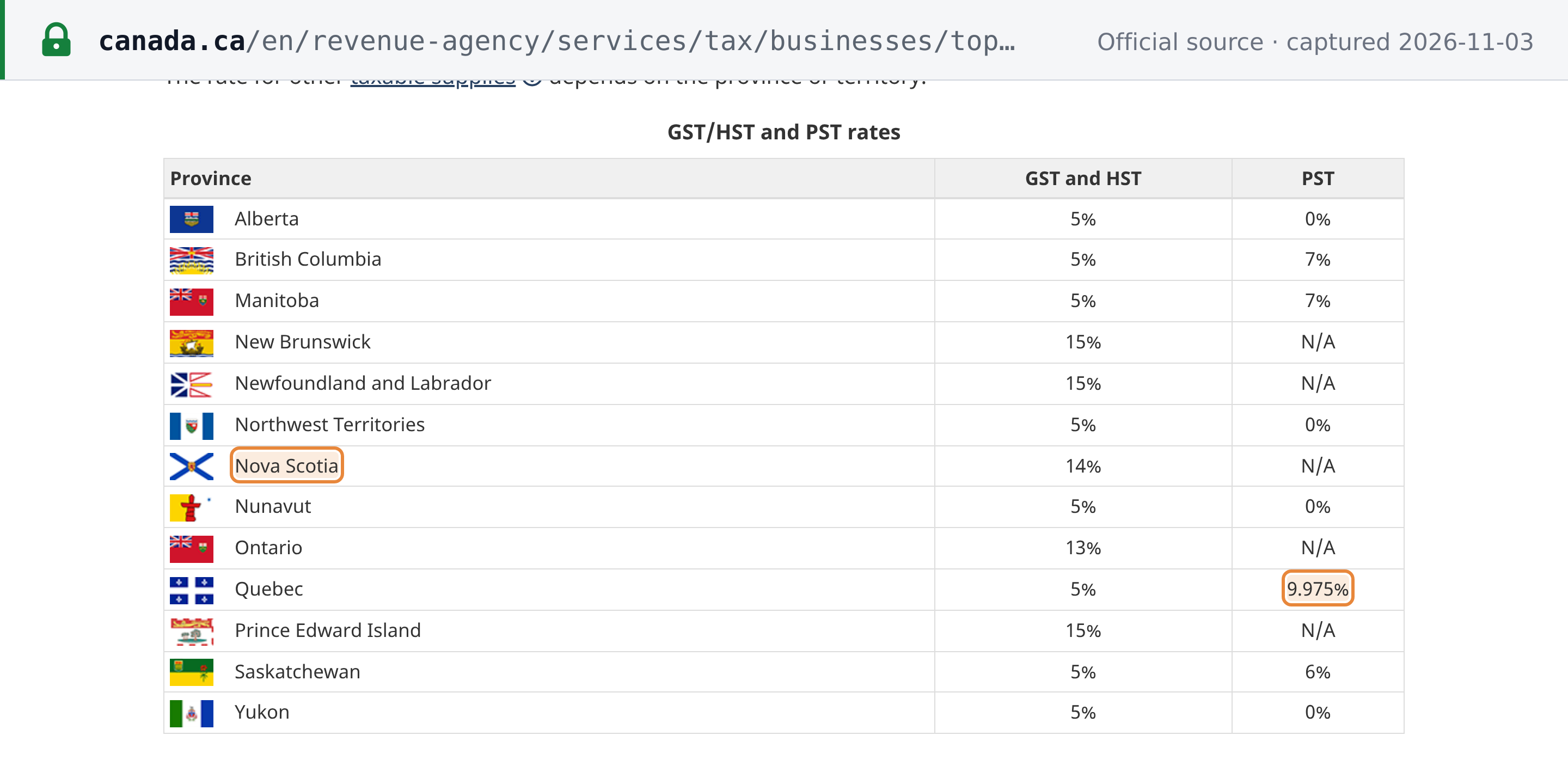
Yes, one number covers both. GST and HST are reported under the same GST/HST program account, the one with the RT program identifier, so the registry search is the same whichever tax the invoice shows. As at 3 November 2026 the CRA’s rates table lists HST at 13% in Ontario, 14% in Nova Scotia and 15% in New Brunswick, Newfoundland and Labrador and Prince Edward Island, and GST at 5% in the other provinces and territories. Quebec sales tax (QST) numbers are not on the GST/HST Registry: the CRA says to confirm a QST number with Revenu Québec. [6] [9] [1]
 Source snapshot captured 2026-11-03 — original
My supplier is a non-resident digital business. How do I tell whether it is a Simplified GST/HST registrant?
Look it up on the CRA’s separate Simplified GST/HST Registry, which lists digital economy businesses registered for the simplified GST/HST. The normal registry search cannot tell you: its result does not show the program account suffix, and a Simplified registrant’s number can return “GST/HST number registered on this transaction date.” there too (as at 2026-11-05). It matters because the CRA says a business registered for the normal GST/HST that buys from a business on the Simplified list “must provide that other business with evidence that you are registered for GST/HST in order not to be charged the tax. Otherwise, you will be charged the tax and cannot claim input tax credits or claim a rebate for the GST/HST you paid on those purchases.” [8]
What do I need to support an input tax credit, and should I keep the registry result?
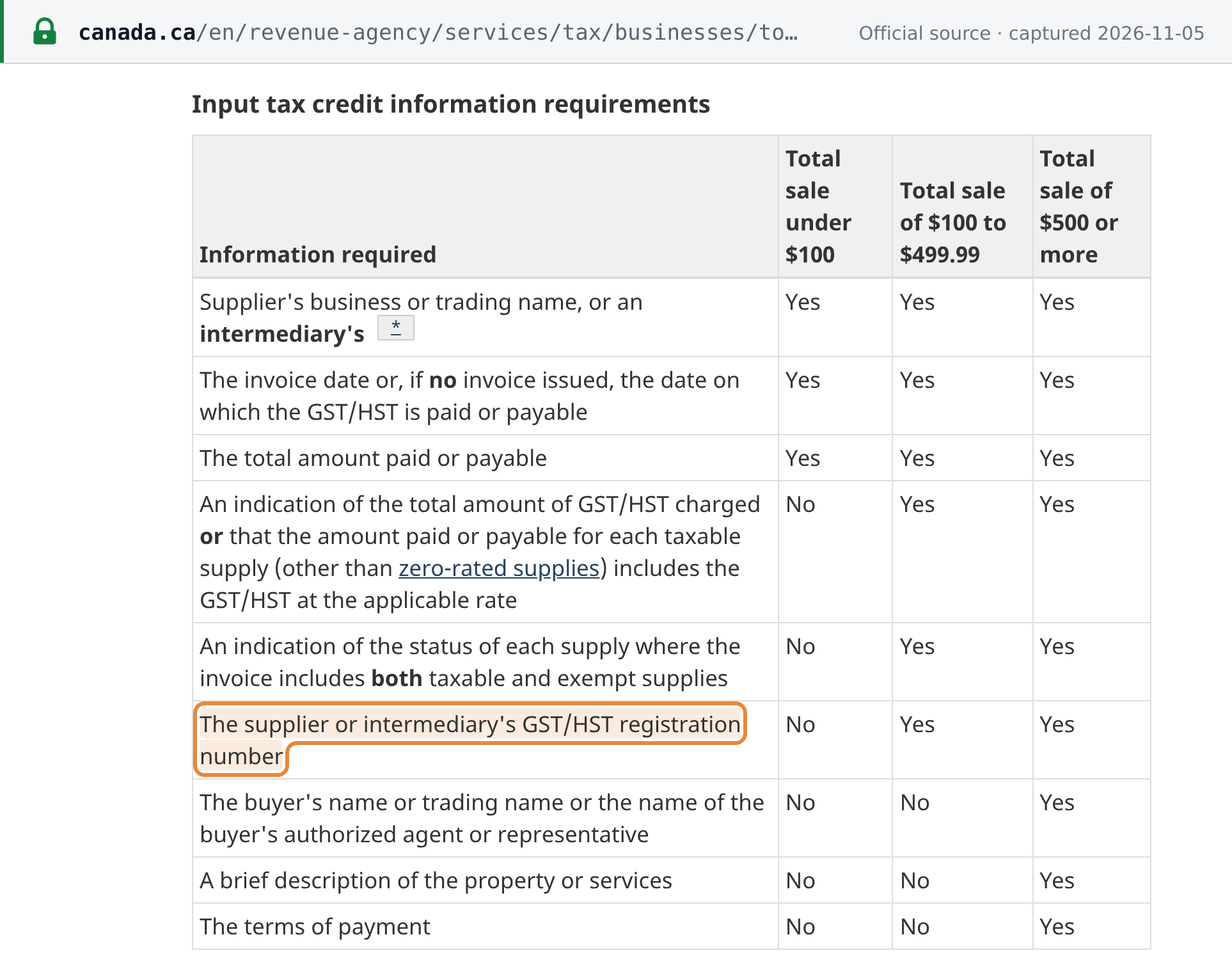
Under section 169(4) of the Excise Tax Act, you cannot claim an input tax credit unless, before filing the return, you have obtained “sufficient evidence” to determine the credit, including any prescribed information. The prescribed information includes the supplier’s GST/HST registration number once the total on the invoice reaches $100: the CRA says a supplier must show the number on receipts, invoices, contracts or other business papers for taxable supplies of $100 or more. To check that number, the CRA points you to the GST/HST Registry and says: “Print the Search Details screen to make sure you claim input tax credits only for GST/HST charged by suppliers who are registered.” [10] [11] [1]
 Source snapshot captured 2026-11-05 — original
The registry says “Insufficient information entered.” but my supplier insists it is registered. What could be wrong?
That message means the details you entered do not match the CRA’s file, not that the number is unregistered. The CRA lists the business name, the order of the name, the GST/HST number and the transaction date as the things to check. Common causes: (1) the name on the invoice differs from the name the supplier gave the CRA, or the words are in a different order; (2) a wrong digit, because a well-formed but wrong number gets the same message; (3) a new legal entity, because a business that changes legal form, for example from a sole proprietorship to a corporation, gets a new business number and a new GST/HST account, so an old number on the new entity’s invoice will not match; (4) the registry is only as up to date as CRA records. If the date is the problem, you get “GST/HST number was not registered on this transaction date.” instead. If you still cannot confirm the number after checking the details with your supplier, the CRA says to call its Business enquiries line at 1-800-959-5525. [5] [6] [2]
How Lookuptax can help you in tax ID validation?
Lookuptax validates VAT, GST and tax ID numbers across more than 100 countries through one API, checking each number's format and, where the tax authority offers a lookup, its registration status against the official source.