How to verify CUIT Number in Argentina?
CUIT verification on AFIP website
CUIT number search option is available for free on the Argentina AFIP website. AFIP stands for "Administración Federal de Ingresos Públicos," which translates to the Federal Administration of Public Revenue in English.
- Access the Tool: Go to the AFIP CUIT Search.
- Enter Details: Input the CUIT number (Example:
30-71234315-6). - Security Check: Complete the Captcha challenge to prove you are human.
- Verify Results: Click verify to see the entity details.
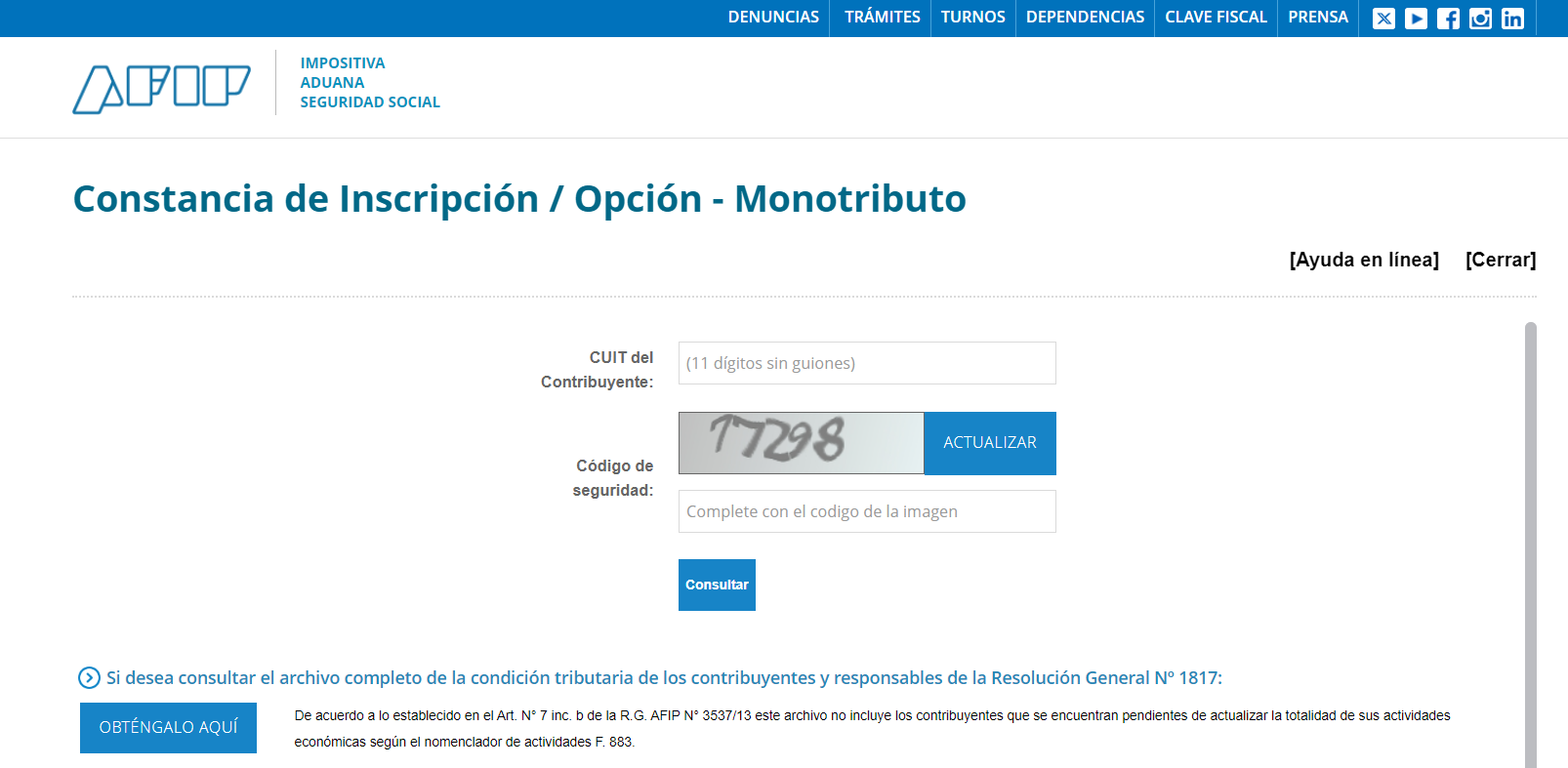 |
| CUIT Verification |
Example: 30-71234315-6
A successful verification of the CUIT on the AFIP lookup tool will return the following details
- Name of the business
- Legal Form of the business
- Social Contract Date
- List of registered national taxes & schemes and it corresponding registration date
- List of registered national activities and it corresponding registration date
- Tax Address
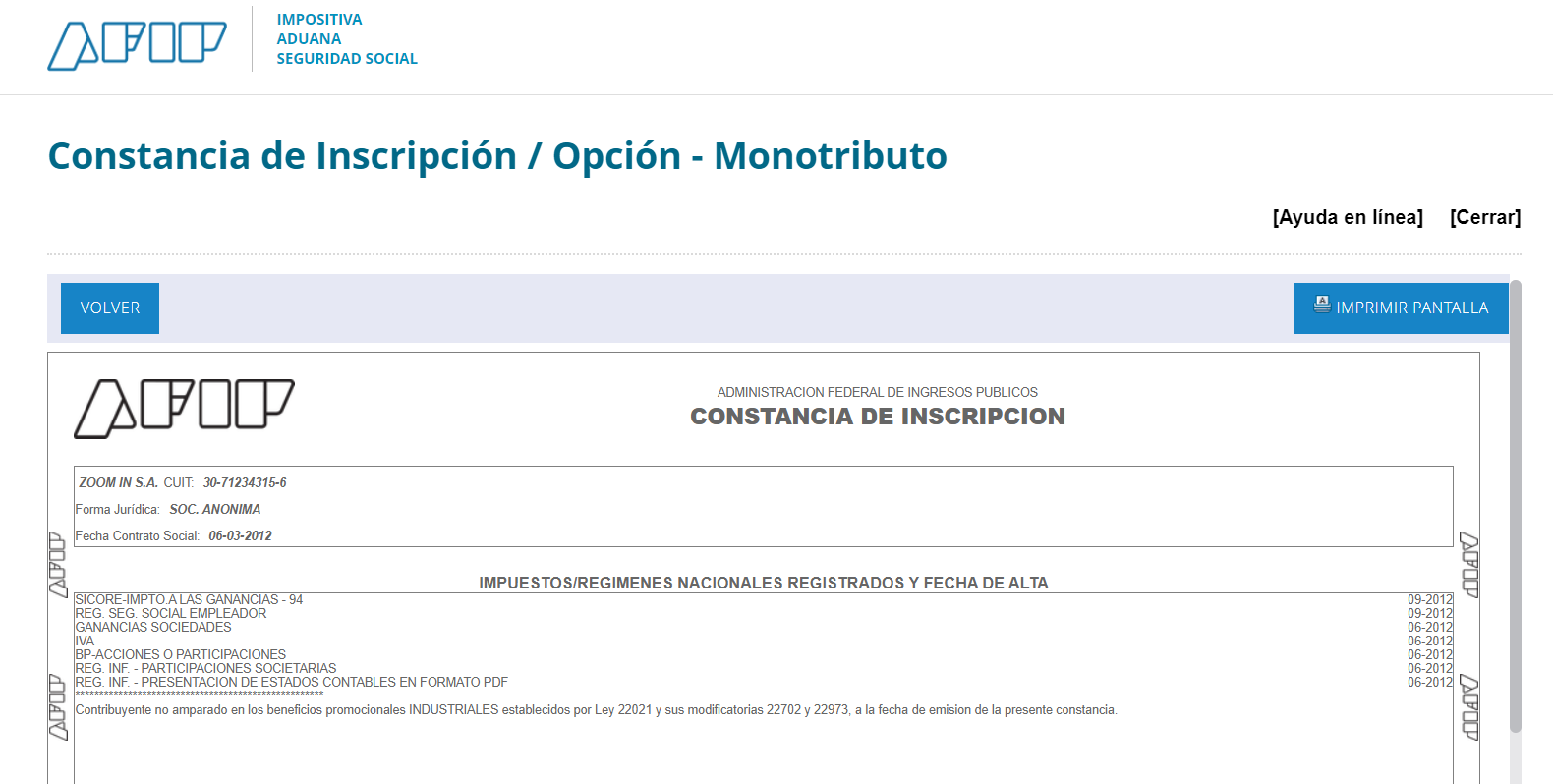 | 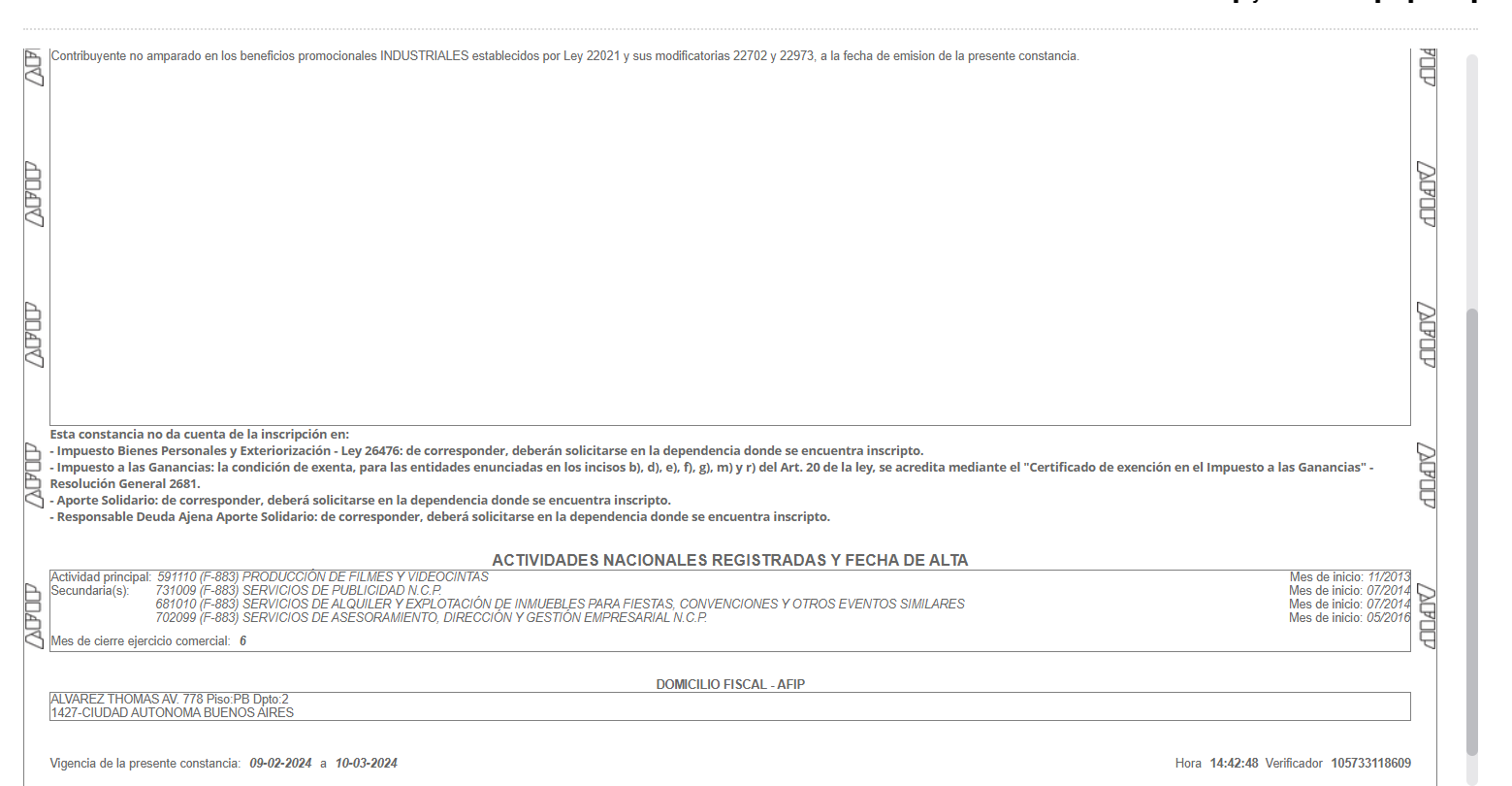 |
| CUIT Verification Status | |
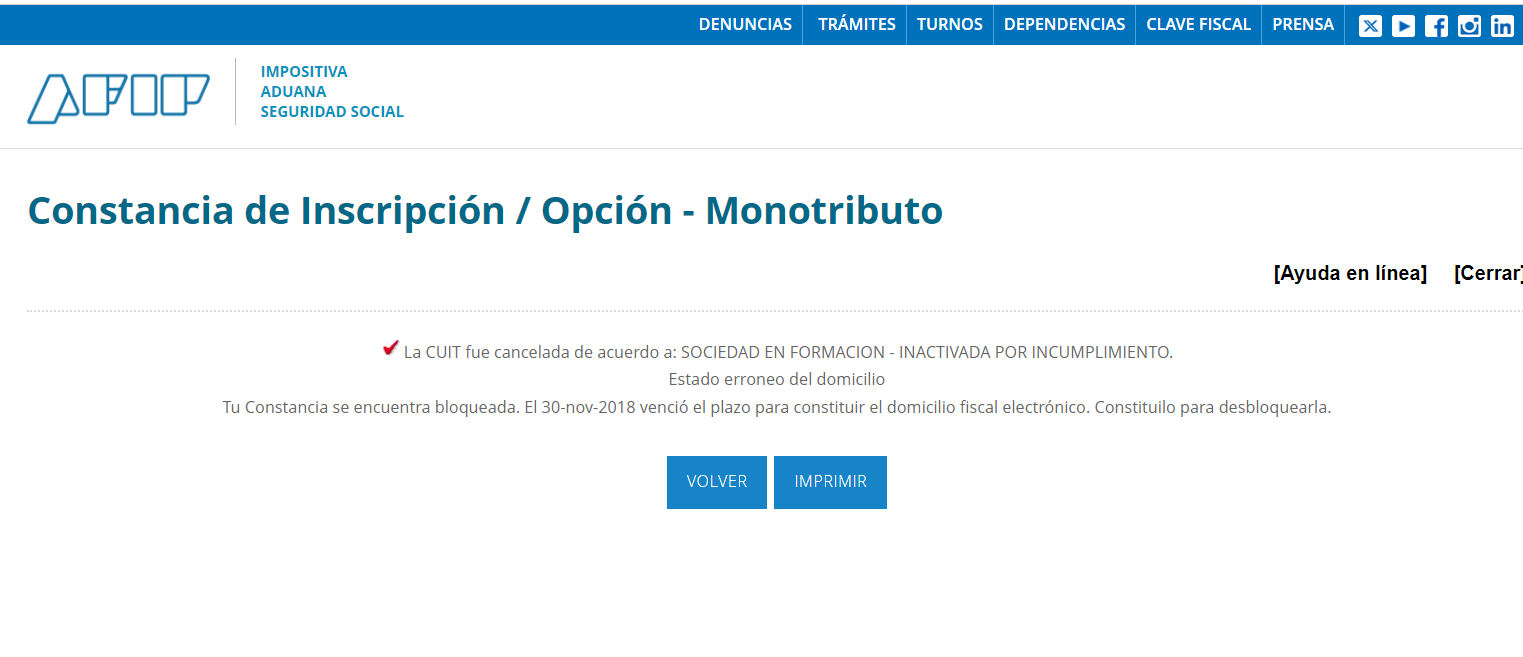 |
| Inactive CUIT |
For more details on taxes in Argentina, see our Argentina Tax ID Guide and, for IVA rates, registration, invoice classes and filing, the Argentina VAT (IVA) country guide.
Frequently Asked Questions
My vendor's CUIT looks valid but the invoice portal rejects it as "CUIT inexistente" or "CUIT inactivo." What causes this?
These are two distinct ARCA errors. "CUIT inexistente" (error code 20001 in the ARCA web service) means the number is not in the registry at all — typically caused by a typo, transposed digit, or using a CUIL or CDI in a field that requires a CUIT. "CUIT inactivo" or "registra inconvenientes" means the CUIT exists but has been administratively suspended. ARCA automatically suspends a CUIT when the taxpayer has filed no tax returns since 1 January of the prior year, has no active tax registrations, or has been flagged in the APOC unreliable-taxpayer base. The holder must log in with their clave fiscal, enter Sistema Registral, choose "CUIT Inactiva," correct the inconsistencies, and resubmit. Reactivation is not instant — ARCA can take several business days to update the public registry. [1]
What is the difference between CUIT, CUIL, and CDI — and which belongs on an Argentine invoice?
All three share the same 11-digit format (XX-XXXXXXXXX-X) but serve different authorities. CUIT (Clave Única de Identificación Tributaria) is issued by ARCA and is the only identifier accepted on Argentine electronic invoices — it applies to monotributistas, responsables inscriptos, and legal entities. CUIL (Clave Única de Identificación Laboral) is administered by ANSES for social security and appears on payslips; if a person already holds a CUIT, their CUIL number is identical to it. CDI (Clave de Identificación) was a code for people without a CUIT or CUIL who needed to be identified for a one-off procedure. Since 2 March 2026, RG 5803/2025 has withdrawn the CDI procedure for individuals and undivided successions and replaced it with a CUIT; existing CDIs stay valid only until the holder must change their registry data, and non-resident individuals request a CUIT through a representative or authorised third party with an address in Argentina (art. 6). CDI holders cannot issue electronic invoices or register for monotributo. Use CUIT on invoices and CUIL on payroll. [1] [2]
The ARCA verification portal is slow or down during peak DDJJ filing deadlines. Are there alternatives?
The public lookup at seti.afip.gob.ar is the only no-login verification option and degrades during Ganancias and Bienes Personales declaration peaks (typically June). ARCA does not publish a public status page. Three documented workarounds: (1) Try portalcf.cloud.afip.gob.ar in an incognito window with cookies cleared. (2) Developers can query the ws_sr_constancia_inscripcion API, which often remains available when the browser portal is overloaded. (3) A downloaded constancia PDF is valid for 30 consecutive days from issuance and is legally accepted by most counterparties — a recent constancia on hand removes the need for a live lookup during outages. [1]
Does the ARCA CUIT lookup show whether a supplier is a monotributista or responsable inscripto, and what their category is?
Yes — this is one of the most useful aspects of the constancia. The Constancia de Inscripción returned by the ARCA lookup explicitly shows the taxpayer's fiscal condition: for monotributistas it prints "Constancia de Opción — Monotributo" with the current category (A through K) and the enrollment date; for responsables inscriptos it lists IVA, Ganancias, and any other registered taxes. This matters for invoice processing: a responsable inscripto adds 21% IVA (claimable as a tax credit), while a monotributista does not charge or credit IVA. Verifying the regime before processing an invoice prevents incorrectly claiming VAT credits that were never charged. [1]
My supplier's CUIT was suspended after I paid their invoice. Do I lose the IVA (VAT) fiscal credit?
This is a significant compliance risk. When ARCA includes a CUIT in the Base de Contribuyentes No Confiables (APOC), it can retroactively impugn invoices from the irregularity period — buyers who claimed IVA fiscal credit may have those credits challenged in an audit, even if the transaction was genuine and payment preceded the suspension. ARCA/BCRA Communication A 8144 (December 2024) further allows ARCA to block card and transfer collections to APOC-listed entities. Best practice: run a constancia check at the time of each significant purchase and save the PDF as proof the CUIT was active on the transaction date. If a supplier is suspended retroactively, consult a contador to assess whether the impugned credit can be defended with the saved constancia. [1] [2]
When an Argentine company invoices a foreign client, what CUIT appears — and does a foreign company need its own Argentine CUIT?
Argentine residents invoicing foreign clients use their own CUIT and select "Cliente del Exterior" as the IVA condition. In place of the client's CUIT, they enter the ARCA-assigned "CUIT país" — a country-level placeholder code from ARCA's official table (E_CUIT_PAIS.csv), where each country has separate codes for persona física, persona jurídica, and other entity types. Using the wrong CUIT-país code (for example, the jurídica code when the counterparty is an individual) causes the CAE request to be rejected. Foreign companies are not required to obtain an Argentine CUIT solely to receive services or make payments to Argentine vendors. However, if a foreign entity registers a local branch or imports goods into Argentina, it must obtain its own CUIT from ARCA. [1]
We integrated AFIP's ws_sr_padron_a5 API to verify CUITs programmatically, but it now returns authentication errors. Is this service still active?
No — ws_sr_padron_a5 was deprecated by ARCA and replaced by ws_sr_constancia_inscripcion (also called scope A55), with the change made official on 10 May 2023. Developers still using ws_sr_padron_a5 as the WSAA token service name receive authentication failures because ARCA removed the old service association. Migration requires: (1) associating your certificate to ws_sr_constancia_inscripcion in the ARCA web services portal; (2) the WSDL endpoint URL at aws.afip.gov.ar/sr-padron/webservices/personaServiceA5?wsdl is unchanged but the service name in WSAA must be updated; (3) the replacement service returns a richer response structure including fiscal condition, activities, and address. For individual-person lookups, ws_sr_padron_a13 remains the correct service. The full catalogue of active and deprecated services is available at the ARCA documentation portal. [1] [2]
How Lookuptax can help you in CUIT validation?
Lookuptax CUIT validation revolutionizes CUIT number validation with its robust platform, empowering businesses to seamlessly verify CUIT numbers across over 100 countries. Our cutting-edge technology ensures accurate and efficient validation, reducing errors and enhancing compliance.