How to verify TRN Number in UAE?
TRN number check on Federal Tax Authority (FTA) website
TRN number search option is available for free on the UAE Federal Tax Authority (FTA) website. You can access the TRN search here. There is a widget available on the right side of the website with title "TRN". Click on the icon to verify TRNs. The search requires you to clear a CAPTCHA for successful verification of TRN.
To verify a UAE TRN:
- Go to the UAE FTA website.
- Click the TRN widget on the right side of the homepage.
- Enter the 15-digit TRN and complete the CAPTCHA.
- Submit — results appear immediately.
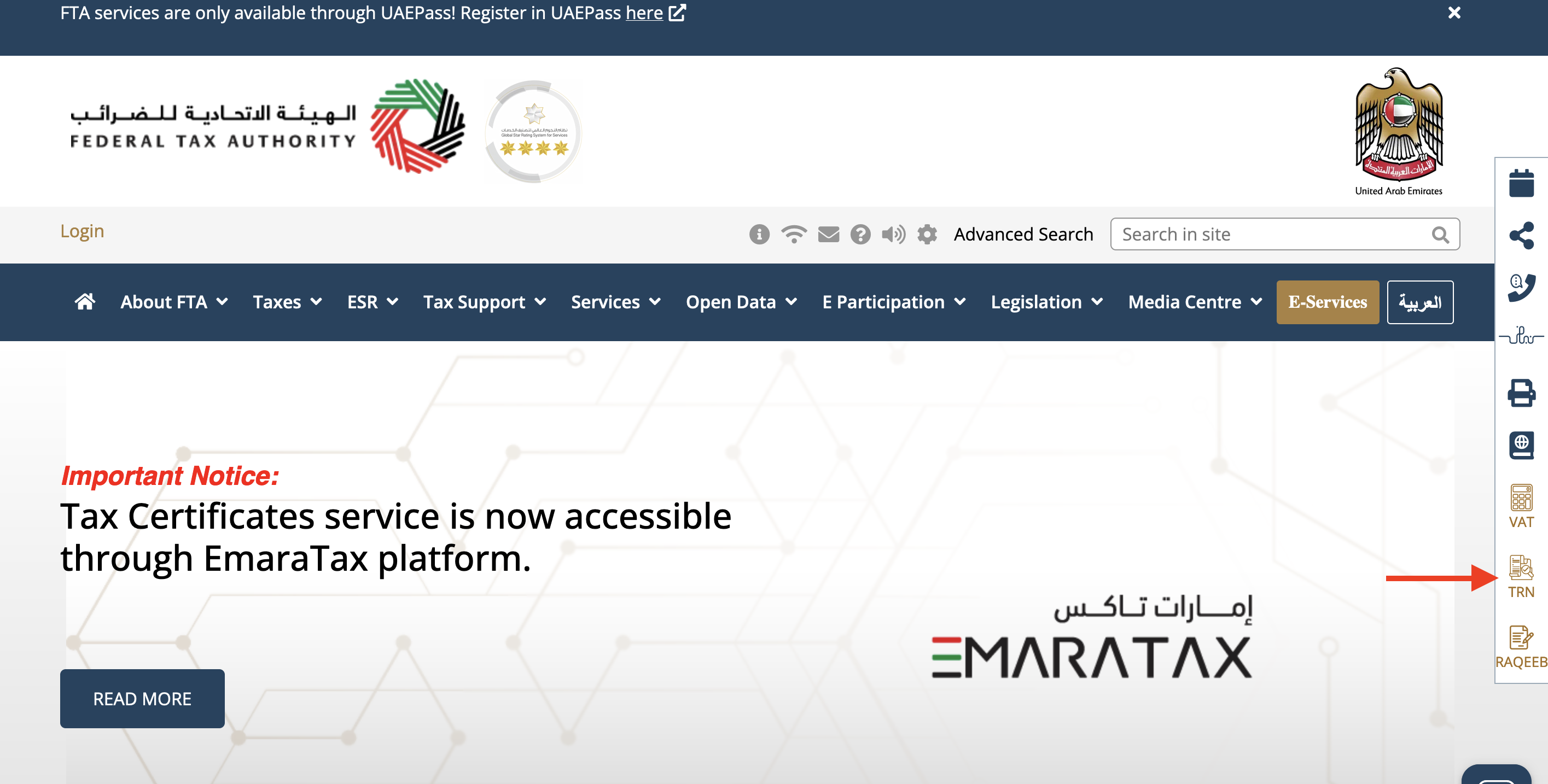 |
| TRN Search option on UAE FTA website |
Example TRN: 100495966200003, 100057605600003
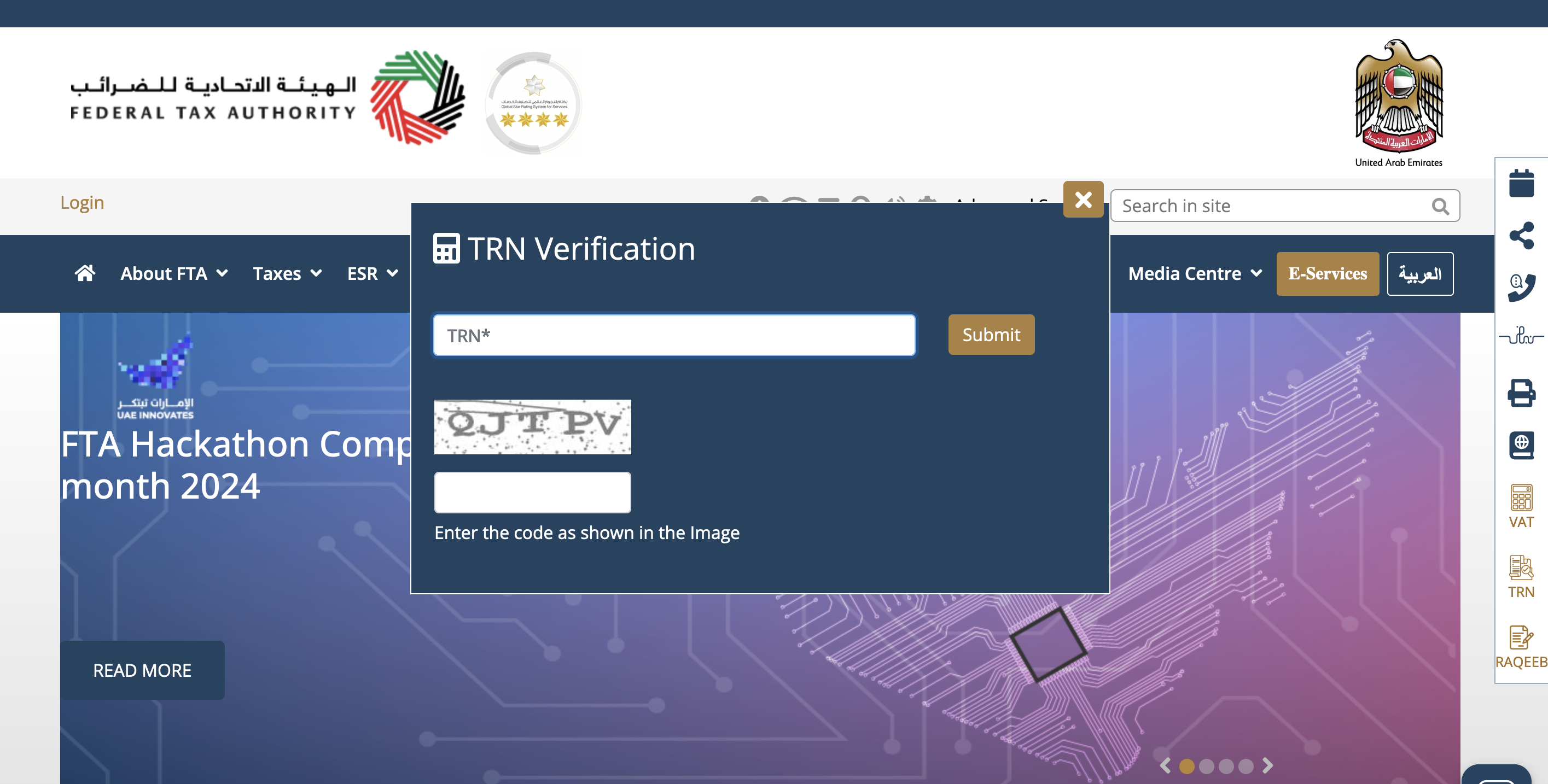 |
| TRN Verification in UAE |
A successful verification of the TRN on the FTA TRN lookup tool will return the following details:
- TRN
- Business Name in English
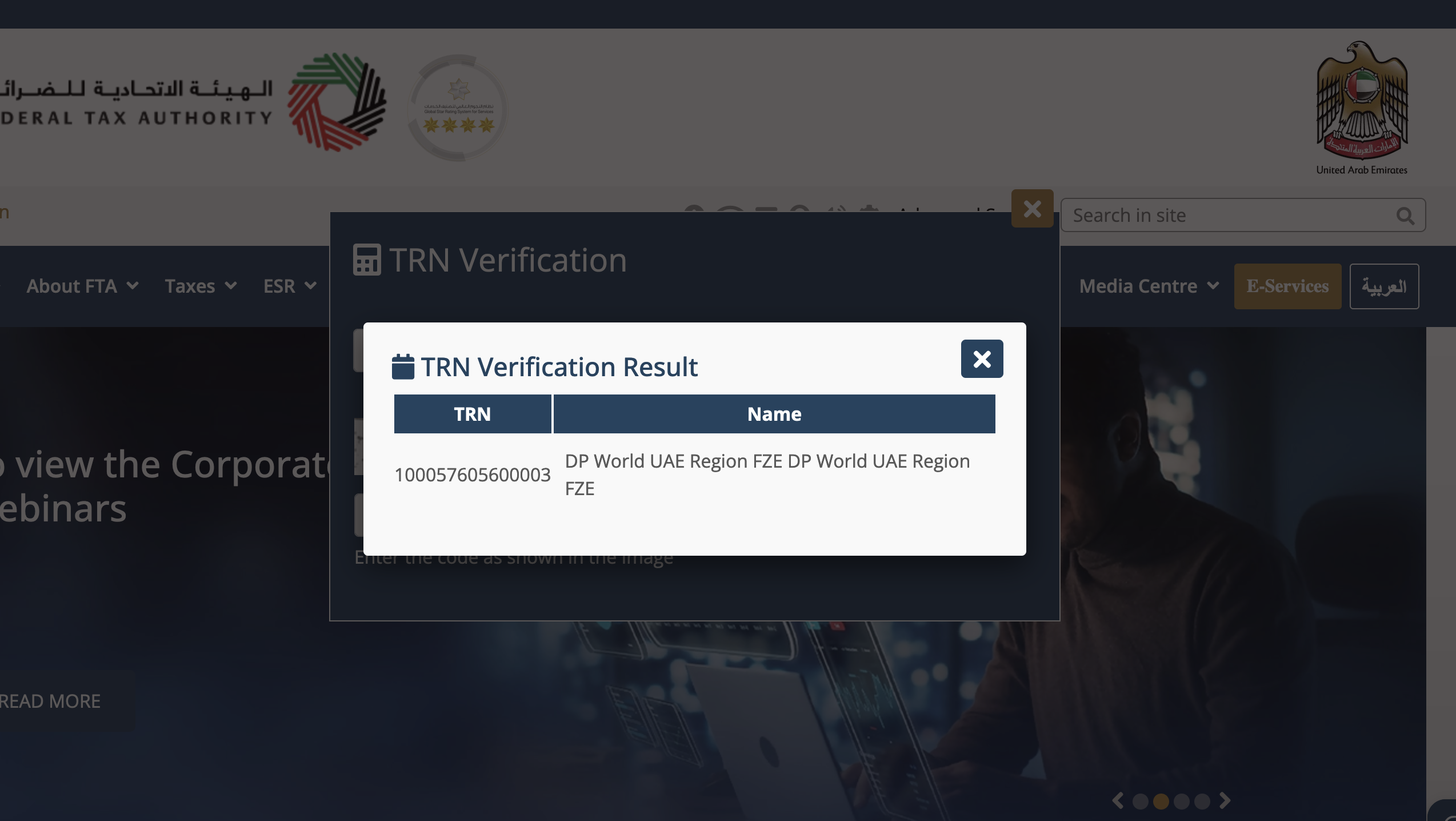 |
| Successful TRN Verification details |
For more details on UAE tax identifiers, see our UAE Tax ID Guide.
Frequently Asked Questions
What is the format of a UAE TRN, and what do the 15 digits represent?
A UAE TRN (Tax Registration Number) is a 15-digit number issued by the FTA. The TRN does not encode publicly documented segment meanings — numbers are assigned sequentially. The last digits typically end in 003 for standard VAT accounts. The TRN must appear on all UAE VAT invoices (mandatory since VAT introduction on 1 January 2018 at 5%). [1]
What is the UAE VAT registration threshold?
UAE VAT (5%) was introduced on 1 January 2018 (Federal Decree-Law No. 8 of 2017). Mandatory registration threshold: AED 375,000 annual taxable turnover. Voluntary threshold: AED 187,500. Non-resident businesses making taxable supplies in the UAE must register regardless of threshold. Zero-rated supplies include healthcare, education, international transport, and first sale of residential property. [1]
The FTA TRN verification shows a name — but how do I confirm the registration is currently active?
The FTA public widget returns a business name if the TRN is valid and active — the FTA removes deregistered TRNs from the lookup. No result means the TRN is invalid, not yet active (new registrations can take 3–7 business days), or deregistered. For official confirmation, request the supplier's Tax Registration Certificate from their EmaraTax portal account. Keep a dated screenshot as audit documentation. [1]
When does the reverse charge mechanism apply in the UAE?
The UAE applies reverse charge (RCM) for: (1) imports of goods — the importer accounts for VAT; (2) services received from abroad — a UAE VAT-registered business receiving services from a non-UAE supplier self-assesses 5% UAE VAT. For B2B imported services, the UAE buyer needs their own TRN. Non-UAE suppliers providing B2B services subject to RCM do not need a UAE TRN. [1]
My supplier is in a UAE free zone — do they need a TRN?
Most free zones follow standard UAE VAT rules — businesses meeting the threshold must register for a TRN. However, designated zones (specified free zones by Cabinet decision, e.g. parts of Jebel Ali) have different rules: goods may move between designated zones VAT-free. Services in designated zones generally follow standard UAE VAT rules. Always verify whether a free zone supplier is in a "designated zone" before applying VAT treatment. [1]
What must appear on a UAE VAT invoice for input tax credit claims to be valid?
A UAE tax invoice for ITC must include: (1) "Tax Invoice" label; (2) Supplier name, address, and TRN; (3) Sequential invoice number and date; (4) Customer name, address, and TRN (for B2B); (5) Description and quantity of supply; (6) Unit price excluding VAT; (7) VAT rate (5% or 0%) and total VAT in AED; (8) Total amount in AED. Simplified invoices (for B2C supplies under AED 10,000) don't require the buyer's TRN. [1]
Is there a programmatic API to verify UAE TRN numbers at scale?
The FTA does not provide a public REST API for TRN verification — only the CAPTCHA-protected website widget. For large-scale validation, options include: (1) using third-party validation services like Lookuptax; (2) requesting suppliers' FTA-issued Tax Registration Certificates as official proof; (3) building supervised internal workflows. The FTA provides e-invoicing APIs for tax reporting but not for public TRN lookup. [1]
How Lookuptax can help you in VAT validation?
Lookuptax VAT validation revolutionizes VAT number validation with its robust platform, empowering businesses to seamlessly verify VAT numbers across over 100 countries. Our cutting-edge technology ensures accurate and efficient validation, reducing errors and enhancing compliance.